Skip to content


If you sell on Grailed, you already know the pattern. A listing gets a burst of views in its first week, then the likes slow down, the offers stop, and the item sits there collecting digital dust.
Here’s the good news: you don’t have to slash your price to fix it. Learning how to relist on Grailed is one of the easiest, free ways to push your items back in front of buyers and revive stale listings.
In this guide, we’ll walk you through what relisting on Grailed means, why it works, exactly how to do it step by step, and the seller-tested strategies that separate a smart relist from a wasted one.
What Does It Mean to Relist on Grailed?
Relisting on Grailed means taking down an old, stagnant listing and posting the same item again as a brand-new listing. You delete the old one, then create a fresh copy with the same (or improved) photos, title, and description.
Think of it like rotating stock in a retail store. The product hasn’t changed, but you’ve moved it back to the front window where shoppers actually see it.
It’s important to know that relisting is not the same as bumping. Bumping is Grailed’s built-in refresh feature, and it comes with limits, which we’ll cover shortly. A true relist starts your item’s life over from day one.
Relisting vs. Bumping: What’s the Difference?
Grailed’s bump feature pushes a listing back to the top of search results and follower feeds without deleting it.
It sounds like relisting, but the rules are stricter.
During a listing’s first 30 days, you can bump it once every 7 days. After 30 days, you can only bump again if you drop your price by at least 10%.
That price-drop requirement is exactly why relisting exists as a strategy.
A full relist resets the clock, restores your free bumps, and doesn’t force you to discount.
Use bumps as your first line of defense on newer listings. Save the full relist for items that have truly gone stale.
Why Relisting on Grailed Works?
Grailed’s search algorithm favors fresh listings. When you relist an item, the platform treats it as a new listing and pushes it higher in search results and buyer feeds.
That visibility boost matters more than most sellers realize. Buyers on Grailed rarely scroll past the first few pages of results, so an aging listing is practically invisible.
Here’s what a well-timed relist can do for you:
1. Restore your search ranking. Fresh listings appear higher when buyers search for your brand or category, which means more eyes on your item.
2. Attract new buyers. Grailed’s buyer base grows constantly. Shoppers who joined last month never saw your six-month-old listing.
3. Reset stale engagement signals. A listing with 400 views and no sale can signal “overpriced” to buyers. A relist wipes the slate clean.
4. Protect your price. Price drops also boost visibility, but relisting lets you regain attention without cutting into your profit margin.
5. Give you a chance to improve. Every relist is an opportunity to sharpen your photos, rewrite your title, and add better keywords.
Also Read: How to Relist on Depop?
When Should You Relist an Item on Grailed?
There’s no official timer, but experienced Grailed sellers watch for clear signals. As a general rule, relist when a listing has gone quiet and stopped pulling views, likes, or offers.
Here are the most common signs it’s time to relist:
1. Engagement has flatlined. Little to no views, likes, or offers over several weeks means the algorithm has buried you.
2. The listing is 60+ days old with no sale. Most items get their strongest push in the first month.
3. You’ve made major updates. New photos, a rewritten description, or updated measurements deserve a fresh start.
4. Peak season is approaching. Relist that vintage parka in early fall, not mid-July, so it lands when demand spikes.
5. Grailed removed your aged listing. Grailed can delete very old listings, so if you still have the item, relist it.
One caution: don’t relist items that are only a week or two old. Grailed can remove duplicate listings of the same product, and buyers notice when a feed recycles the same pieces on a loop.
How to Relist on Grailed Using the Sidekick Tools App?
1. Download the Sidekick Tools app on your phone and log in to your account.
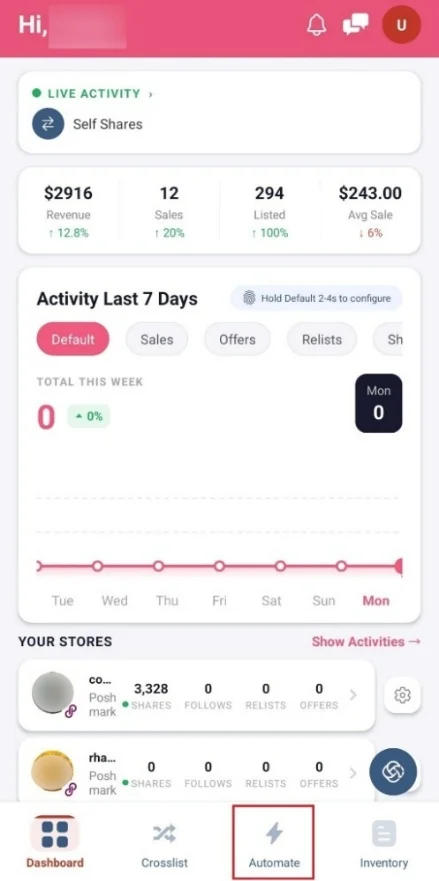
2. Next, tap “Automate” at the bottom of your screen.
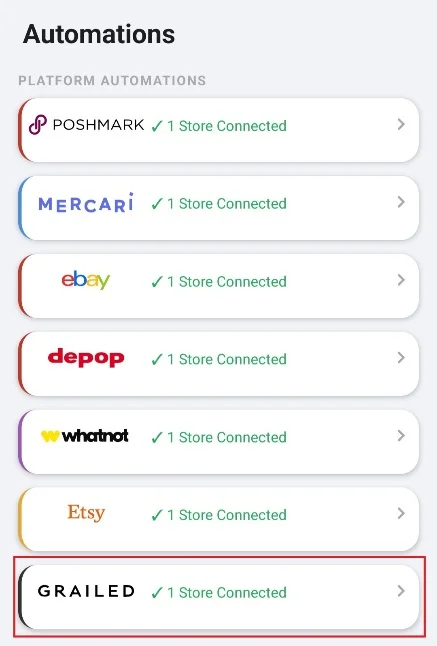
3. Tap “Grailed” and select your Grailed Account. If not connected, connect you Grailed account first.
4. Then, tap the “Configure” button right next to Auto Relist.
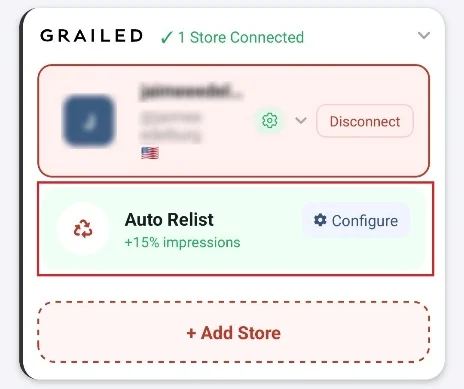
5. In the Auto Relist Settings, turn on the “Relists” toggle.
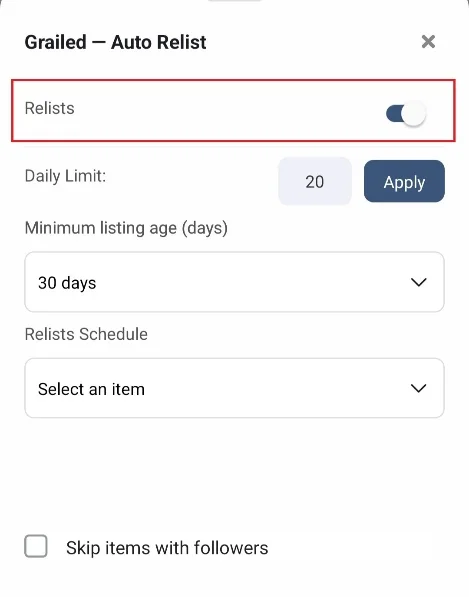
6. Select the “Daily Limit” and tap the “Apply” button.

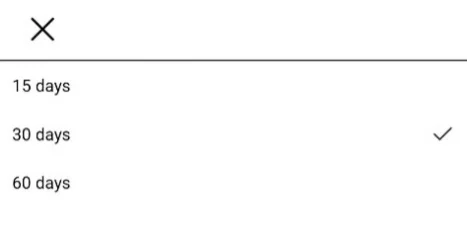
7. Next, select the “Minimum Listing Age (Days)” from the dropdown menu. You can select 15 days, 30 days, or 60 days.
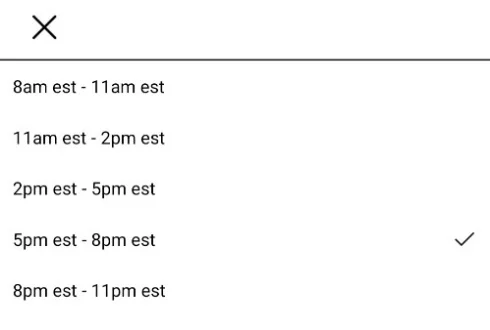
8. Lastly, select the “Relists Schedule” from the dropdown menu to set the time slot for relisting.
Frequently Asked Questions (FAQs)
Does relisting on Grailed cost anything?
No. Listing on Grailed is free, and so is relisting. You only pay fees when your item sells.
Will I lose my likes when I relist?
Yes. Deleting a listing removes its likes and views. That’s actually part of the point, since a fresh listing without stale engagement often performs better.
How often should I relist the same item?
Wait until a Grailed listing goes stale, usually after 30 to 60 days of low engagement. Relisting too often can look spammy and risks duplicate removal.
Is relisting against Grailed’s rules?
No, as long as you delete the old listing before posting the new one. Never have two identical listings on Grailed at the same time.