Skip to content


Stale listings are the silent killers of your Depop sales. If your items aren’t moving, the best strategy is to relist on Depop to jumpstart your sales and clear out your inventory.
Depop algorithm favors fresh listings. When you give an old item a new life by relisting it, the algorithm treats it like a new arrival for shoppers.
In 2026, you don’t need thousands of followers to make sales on Depop. You just need to know how to keep your items appearing in front of buyers, and there is no better way to do it than relisting.
Here’s how you can relist on Depop and make 7x sales.
What is Depop Relisting?
Relisting on Depop is the process of delisting an old item and listing it again as a fresh item.
This is an effective strategy because Depop’s search algorithm prioritizes “newness,” meaning fresh listings show up much higher in a buyer’s feed.
Usually, Depop sellers use the “copy listing” feature to save time when copying descriptions and photos to the new version.
Once the new listing draft is ready, the seller deletes the original listing to avoid getting penalized for having duplicate items in their Depop shop.
Essentially, relisting is a way to give an item a “second chance” to get discovered by buyers on Depop who missed it the first time.
Is Relisting Same as Refreshing on Depop?
No relisting on Depop is not the same as refreshing, and confusing the two is exactly why most Depop sellers fail to see results.
Relisting on Depop means deleting the old listing and creating a new one with the same or slightly different details.
On the other hand, refreshing on Depop is opening a listing, clicking “Edit,” and then clicking “Save” without making any changes to the actual listing.
In the early days of Depop, refreshing helps “bump” your item. However, in 2026, refreshing on Depop doesn’t work and does nothing to your search ranking.

Does Relisting on Depop Help with Sales?
Relisting on Depop does help boost sales because it refreshes your listings and makes them visible to new buyers.
When you relist an item on Depop, it instantly appears higher in Depop search results, increasing clicks and engagement. This is especially useful on Depop, where newer listings get more attention.
It also gives you a chance to update titles, keywords, and prices of your Depop listings for better SEO optimization. As a result, your items match more buyer searches.
Moreover, relisting signals activity to the Depop algorithm, which improves your Depop shop’s visibility over time.
When Should You Relist on Depop?
1. If Your Listings Have Low Engagement
If you notice your Depop listings have very few likes or views, it is time to relist. Depop’s algorithm favors fresh listings, meaning stale listings sink to the bottom of search results.
By deleting and relisting, you push your items back to the top of the Depop feed. This gives your listings a second chance to be seen by buyers on Depop.
Also, fresh listings act like a magnet for new followers on Depop and also increase visibility, which leads to faster sales.
2. If Your Listings Remain Unsold for 30+ Days
Items that sit unsold for months take up space in your Depop shop and your home. Older listings make your store look outdated or neglected to picky buyers who want fresh finds.
Relisting these items helps you reach people who may have missed them the first time. It also signals to the Depop community that you are an active and motivated seller who cares about your inventory.
Removing old listings and starting fresh makes your Depop shop worth a daily scroll for your followers.
3. If You Want to Make Major Changes to Your Listings
Making major changes to your Depop listing details is also a great reason to relist. Replacing old boring photos and product descriptions with great photos and properly written product descriptions makes a lot of difference.
If you have better lighting or a new camera, use those to update photos of your Depop Listings. You should also consider changing tags and keywords in your Depop listings and relisting them to help buyers find them.
A well-detailed listing helps build trust with Depop buyers. Clearer photos and SEO-optimized descriptions lead to better reviews and fewer questions from confused buyers during the buying process.
4. If You’re Selling Seasonal Items
Selling seasonal items on Depop requires perfect timing to maximize your profits. Relisting winter coats in November or swimsuits in May ensures your items hit the Depop feed at peak demand.
Relisting seasonal items right before the season starts makes them visible to the right buyers on Depop. Depopers are actively looking for these items during peak season months of the year.
If you relist your items according to the seasonal demands, you’ve a great chance to sell them quickly on Depop.
5. If Variants of a Listing Aren’t Getting Sales
Sometimes you have multiple colors or sizes of an item, but only some sell well on Depop. This means the low-performing variations need relisting to find the right buyer.
Relisting those listing variations not only enables you to update keywords, titles, descriptions, and photos, but also makes them visible to relevant buyers on Depop.
Relisting helps you highlight the features of slow-moving items to attract the right kind of buyers who want to buy exactly what you have.
When Is the Right Time to Relist on Depop?
You should relist an item on Depop if it has been sitting for more than 30 days without a sale or new likes.
Also, timing really matters when it comes to relisting on Depop.
The best time to relist on Depop is between 7:00 PM and 10:00 PM on weekdays. This is when most Depopers are active on their phones after work or school.
On weekends, the best time to relist is Sunday evening because that is when Depop gets the most traffic.
However, you must be careful not to relist 100 items at once, as this will make it look spam and will hurt you big time. Instead, relist 5-10 items a day on Depop to keep a steady flow of “new” arrivals.
This relisting strategy will ensure your listings appear in search feeds daily without flooding the Depop app.
Also Read: How to Bundle on Depop
Mistakes to Avoid When Relisting on Depop?
1. Mass Relisting of Items
Many Depop sellers think relisting all their listings at once is the right way, as it saves them time. However, relisting over 20 items in a single hour makes it look like bot activity to Depop.
Depop monitors everything, including how fast you list and relist. If you’re relisting too quickly, the Depop algorithm will flag you as a spammer rather than a human.
So, instead of a mass relisting, relist your items throughout the day. This will keep your Depop listings constantly visible in the feed.
2. Relisting Without Making Any Changes to the Listings
Copy-pasting the same descriptions and titles while relisting on Depop is a common shortcut. While it saves time, it signals to Depop that you’re trying to manipulate the algorithm.
The Depop algorithm prioritizes “freshness,” but it also prioritizes relevance. If your title is a generic string of keywords you’ve used ten times before, Depop will de-prioritize it in favor of a listing that gets relisted with proper changes.
Making changes to the listing before relisting not only improves their visibility but also their rankings on Depop significantly.
3. Deleting and Instantly Relisting
Deleting and instantly relisting the same items on Depop several times a week is a risky move. This pattern looks manipulative to the Depop algorithm.
If Depop sees you constantly deleting active listings and relisting them, it will reduce your overall visibility. Also, your Depop listings will stop appearing on the Explore Page entirely.
Patience is key when it comes to relisting on Depop. Give your items at least 30 days to get organic likes and views.
How to Relist on Depop Manually?
1. Open the Depop app and tap on “My Depop” on the bottom right of your screen.
2. Next, go to the “Shop” section and open the active listing you want to relist.
3. Then, tap “Preview Listing” and after that tap the “Three-Dot” menu and from the pop-up menu, choose “Copy to a new listing.”
4. Update the listing details like photos, title, description, and tags, like the way you want. Once you’re done, tap “Post Listing.”
5. Now, you need to delete your old Depop listing, for which you need to go to My Depop > Shop > Listing > Preview Listing > Three-Dot Menu > Delete Item.
6. A final pop-up will appear saying, “Are you sure you want to delete this item?” Tap“Delete.”
How to Relist on Depop Using Sidekick Tools?
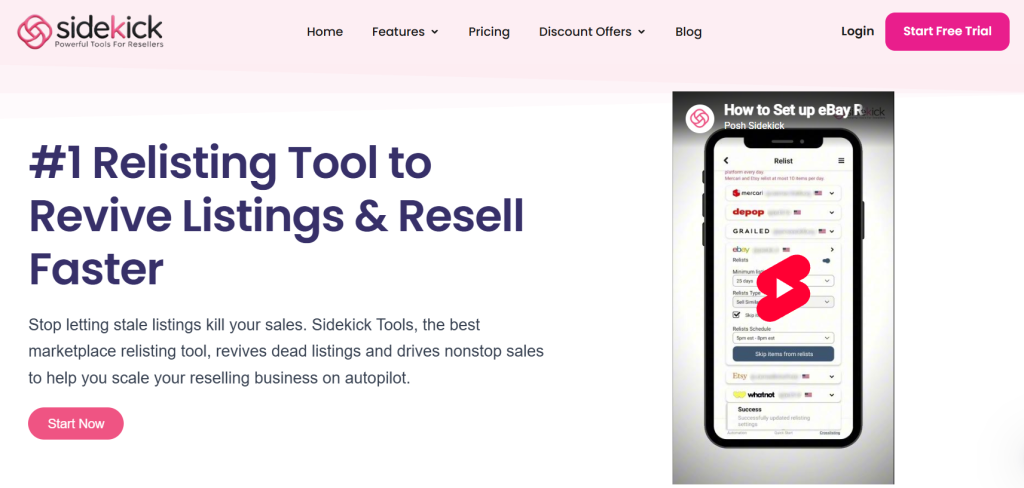
1. Open the Sidekick Tools app on your Android/iOS mobile device and sign in to your account.
2. Next, tap “Crosslisting” on the bottom right of the screen.
3. Then, tap the “Hamburger Menu” on the top right of the screen and from the menu options, select “Relisting.”
4. Next, select “Depop” from the available marketplaces. (Connect your Depop account to the Sidekick Tools app first if it’s not already connected.)
5. Then, switch the toggle to “On.” The toggle button will be right in front of “Relists” under the Depop tab.
6. Select “Minimum Listing Age (Days)” and “Relists Type.”
7. Check“Skip Items on Sale” if you don’t want to relist items that are on sale.
8. After that, select “Relists Schedule.”
9. Lastly, tap “Skip Items from Relists” to skip any items that you don’t want to relist.
Sell 7x More on Depop with Sidekick Tools, the Best Depop Relisting App
Let’s be honest: manually relisting on Depop is a massive time sink. Unless you enjoy spending 10+ hours a week hitting “Edit” and “Post” just to stay visible.
Sidekick Tools gives you that time back by relisting your Depop items on total autopilot. By automating relisting, Sidekick Tools ensures your items are constantly hitting the top of search results.
This isn’t just about saving time; it’s about maximizing visibility and scaling your sales. When you stop grinding through repetitive tasks, you can finally focus on the strategic moves, like sourcing better inventory and selling on other marketplaces, that actually drive 7x growth.
Stop relisting the hard way and let the Sidekick Tools app work for you. Put your reselling business on autopilot and start scaling today.
Get started with a 7-Day Free Trial (no credit card required!)
Frequently Asked Questions (FAQs)
Does relisting delete my item’s “Likes” on Depop?
Yes. However, likes are a “vanity metric.” A like from three months ago is not going to buy your item. A fresh listing with zero likes has a much higher chance of selling than an old listing with 100 likes.
Can I get banned for relisting on Depop?
No, as long as you delete the old listing. Depop only bans users for “Duplicate Listings” (having the same item up twice). If you delete and then repost, you are following the rules.
How many items should I relist at once on Depop?
If you are doing it manually, 10-15 is a good number. If you use the Sidekick Tools app, you can safely relist your entire shop at once because the app manages the speed for you.
Will relisting help if my prices are too high?
Relisting helps with visibility, but it won’t fix a bad price. Use the relist as an opportunity to research current market prices and adjust yours to be competitive.