Skip to content

We’ve all been there: It’s 11:00 PM, you’re finally sitting down to relax, and your phone starts blowing up with Poshmark likes. Your first instinct is to jump into negotiation mode, but your brain is fried.
When Poshmark rolled out the Smart Sell feature, an AI-driven negotiator designed to handle offers and counters for you, it sounded like a dream come true.
I’ll be honest: I wanted to love it. The idea of setting it and forgetting it while the sales rolled in was tempting. But after putting it to the test and seeing the feedback from the reselling community, I’ve realized that while “Smart” is in the name, the reality is a bit more complicated.
In this blog, we’ll try to find out if the Poshmark Smart Sell feature is really useful, or if it’s just a useless negotiation tool that nobody wants.
So, let’s begin!
What is the Poshmark “Smart Sell” Feature and How It Works?
Poshmark “Smart Sell” is a built-in automation tool that manages negotiations for you so you don’t have to manually respond to every offer or interest on Poshmark.
You use it by setting a private minimum price, called a floor price, for any item in your closet. Once enabled, the feature automatically takes over the haggling process by accepting any offers from buyers that meet or exceed your secret minimum and countering those that are too low.
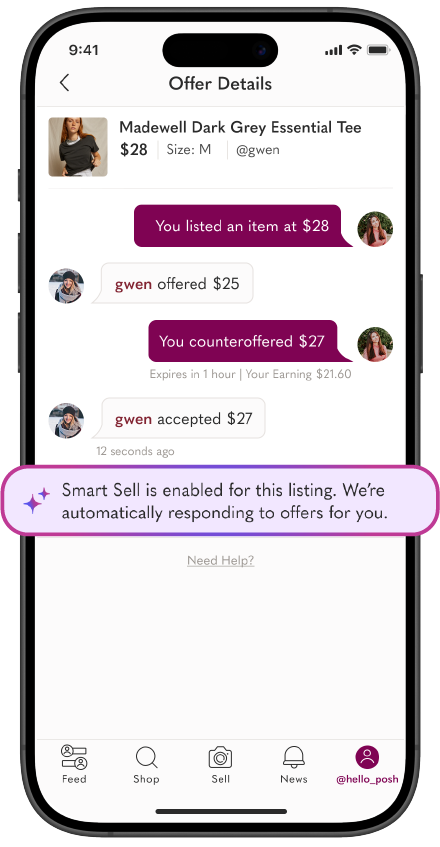
The “Smart Sell” feature also proactively sends out discounted offers to anyone who likes your listing on Poshmark, often within minutes of them showing interest, which helps catch buyers while they are still actively shopping.
The feature is designed to save you time and remove the emotional stress of dealing with lowball offers since the AI handles the back-and-forth professionally and instantly.
It even stays active while you are asleep or away from your phone, allowing you to wake up to completed sales without ever having to open the app to negotiate.
While it is highly efficient for high-volume sellers or people who just want their items gone, it is completely optional for each listing, meaning you can still choose to manually handle offers for certain listings.
Also Read: Are People Making Money on Poshmark
How to Enable “Smart Sell” Feature on Poshmark?
- Start by toggling the Smart Sell option for any individual item directly from your Share page.
- Choose a private minimum price you are willing to accept, or select one of the suggested price points provided by the app.
- Continue sending offers as you normally would; when a buyer makes an offer or a counter-offer, the “Smart Sell” will automatically accept it or negotiate on your behalf.
- The “Smart Sell” feature will ensure to secure a final sale at the highest possible value, staying near your original list price while strictly honoring your designated floor.
My Honest Review About Poshmark “Smart Sell” Feature
To be fair, Poshmark “Smart Sell” isn’t all bad. If you’re a seller just clearing out a closet, it has its perks. It offers zero-effort management because it is built-in and free with no extra apps to download.
Moreover, it provides instant gratification by catching buyers while they are still actively browsing the app. For part-time resellers, it saves the brain power required to do math on margins every time someone likes a twenty-five-dollar shirt.
It is a “better than nothing” solution for those who aren’t looking to maximize every cent. However, for those of us trying to build a consistent side hustle or a full-time reselling business, the cracks start to show pretty quickly.
If you spend five minutes on the Poshmark subreddits, you’ll see a common theme: Smart Sell is a notoriously bad negotiator.

Negotiation on Poshmark is an art, not just an equation, and I noticed this firsthand in my own closet. One of the biggest issues is the insulting counter-offer. I’ve seen Smart Sell counter a reasonable offer with a measly one or two-dollar discount.

To a buyer, that feels like nickel-and-diming. Instead of closing the deal, it often frustrates the buyer, causing them to unlike the item or ghost the sale entirely.
There is also a massive lack of context in how the AI operates. It doesn’t know the difference between a rare vintage blazer and a basic mall-brand tank top. It applies the same rigid logic to everything, failing to understand bundles or your specific profit goals for high-ticket items.
Moreover, there is a distinct “bot” vibe to the interaction. When a buyer likes an item and receives a counter-offer half a second later, it feels robotic and impersonal. A little bit of human delay actually makes a buyer feel like they are negotiating with a real person who values their business.
Sidekick Tools: A Better Way to Make Offers on Poshmark
After watching many sales slip through the cracks of Poshmark’s “Smart Sell,” I realized I needed automation that worked with me rather than instead of me.
That’s when I switched to the Sidekick Tools app. It’s Offer to Liker (OTL) tool feels like the adult version of closet management because it uses strategic delays.
Sidekick Tools takes a few minutes before sending an offer to a Poshmark liker, which feels organic—like you actually saw their interest and decided to give them an offer.
You also maintain total control over your business. Unlike Smart Sell’s “black box” logic, you set the exact percentages you are comfortable with. This means no surprise one-dollar counter offers that scare off buyers.
Sidekick Tools offers the efficiency of a Poshmark bot with the strategy of a human. While Smart Sell just sits there waiting for a like, Sidekick Tools is actively sharing and relisting your items to get those likes in the first place.
Is Poshmark “Smart Sell” Worth It?
If you don’t mind losing a few dollars here or there for the sake of total hands-off convenience, Poshmark’s “Smart Sell” feature might be fine for you.
However, if you’re a serious reseller, Smart Sell will likely cost you money in lost deals and poor negotiations.
For me, the choice was clear. I’d rather have an automation app like Sidekick Tools that acts as an assistant I’ve trained, rather than an AI that’s just guessing.
Your Posh closet is your business, so don’t be afraid to take the wheel back and use tools that actually protect your margins.