Skip to content


We’ve all been there. You list an item on eBay, and suddenly you realize you made a huge mistake in the description. Or maybe the item broke, or you accidentally sold it to a friend locally.
When you need to take down a live auction or fixed-price offer quickly, it can feel incredibly frustrating. If you do not know where to look, navigating the eBay seller hub feels like a maze.
Fortunately, removing an active listing on eBay is simple once you know the exact steps.
In this quick guide, I will show you exactly how to delete an eBay listing from both your computer and your phone.
So, let’s begin!
How to Delete an eBay Listing on Desktop?
1. First, visit the eBay website and log in to your eBay seller account.
2. Next, click “My eBay” on the top right of your screen. From the dropdown menu, click “Selling.”

3. In the “Overview” section, go to “Listings” and and click “Active Listings.”
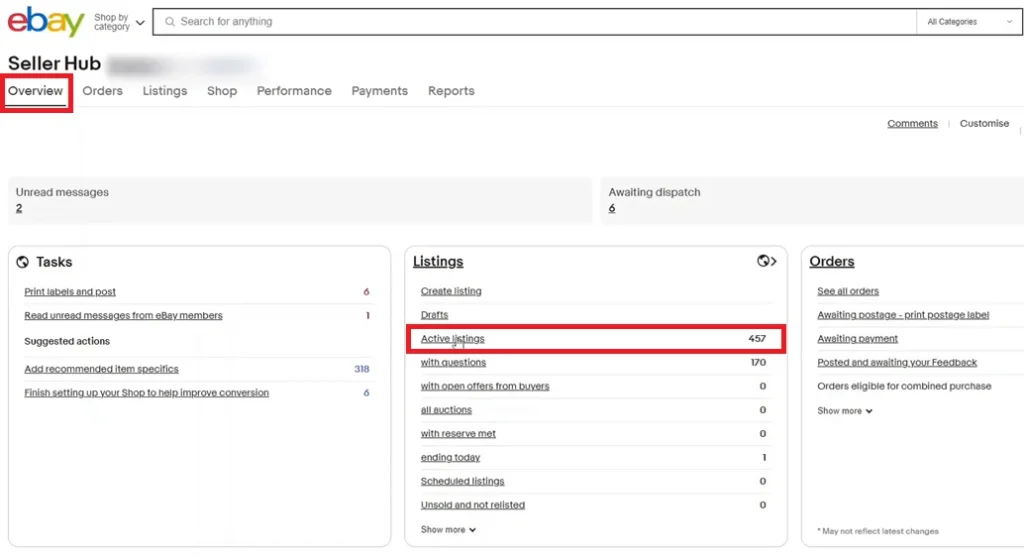
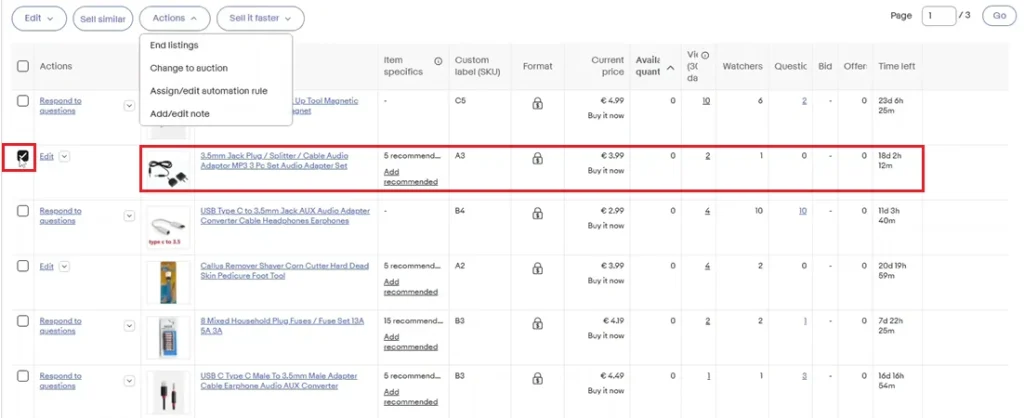
4. Find the listing that you want to delete and click on the Checkbox.
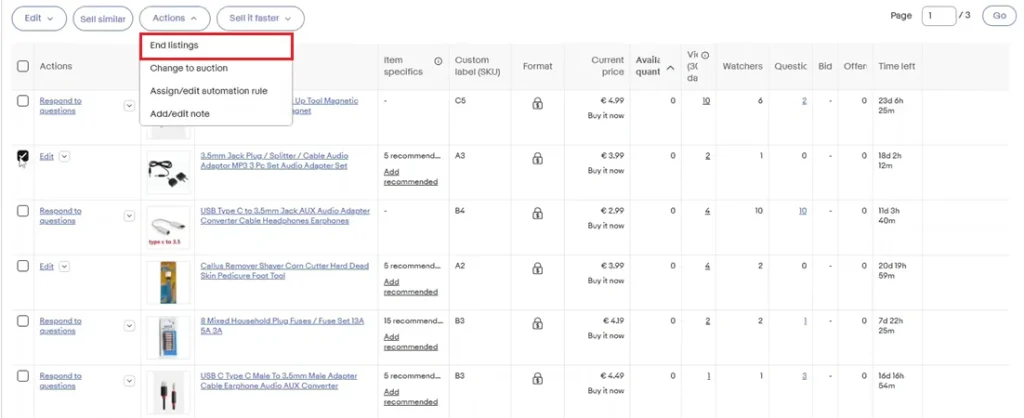
5. Lastly, click the “Actions” tab and from the options, click “End Listing.”
How to Delete an eBay Listing on the eBay app?
1. Open the eBay app on your phone and log in to your seller account.
2. Tap the “Selling” tab on the top left corner.

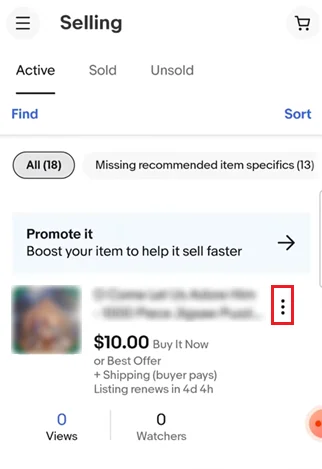
3. Next, tap “Active” to see all the active listings in your eBay account.
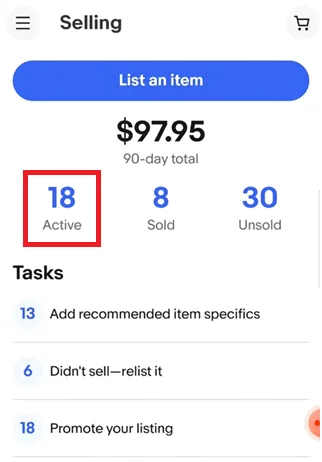
4. Find the listing that you want to delete and tap the “3 vertical dots” icon on the right.
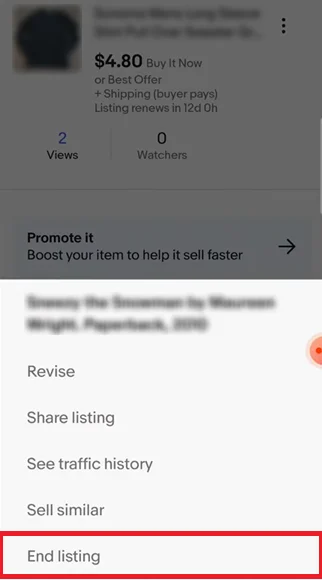
5. From the options, tap “End Listing.”
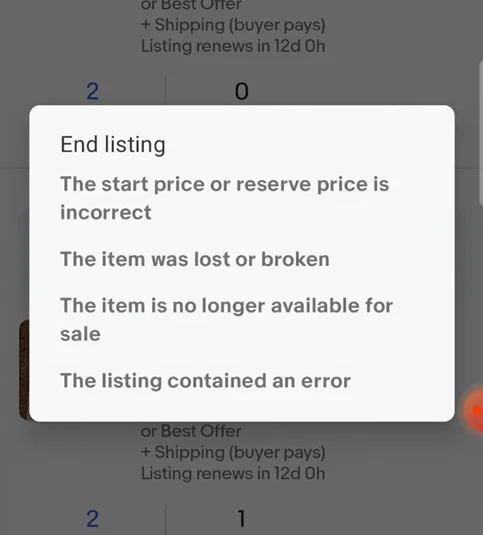
6. Lastly, select the reason for deleting the listing.
What Happens After I Delete an eBay Listing?
After you delete or end an eBay listing, it is removed from active search results and buyers can no longer purchase that item from the listing. If the listing had watchers, they will no longer be able to buy it unless you relist it later.
However, deleting a listing on eBay does not erase all history. eBay may still keep a record of the listing in your seller account for tracking, reporting, or policy reasons. If the item had already sold, you cannot delete the transaction itself.
Any active offers, views, and watchers tied to that listing usually stop once the listing ends. If you want to sell the same item again, you will need to relist it or create a new listing.
Also Read: How to Delete a Listing on Poshmark?
Why Can’t I Delete a Listing on eBay?
1. The Listing Is Active, So eBay Wants You to End It Instead
If your item is currently live on eBay, the platform usually does not show it as something you simply delete. Instead, you need to go to Seller Hub, find the active listing, and choose End listing.
This is because active listings are visible to buyers. They may appear in search results, watchlists, carts, promoted listings, or saved searches. eBay has to protect the buyer experience, so it uses a controlled ending process instead of letting sellers casually erase active listings.
For fixed-price listings, eBay says Good ’Til Canceled listings renew every month until the item sells or until you end the listing.
2. The Listing Has Bids
If your eBay listing is an auction and buyers have already placed bids, you may not be able to delete or end it freely. eBay places stricter rules on auction listings because bids create buyer expectations.
According to eBay, auction listings with bids can only be ended one at a time, and the seller must select a valid reason. eBay also warns that ending listings early can disappoint bidders and may lead to limits or account restrictions if done regularly.
This is one of the most common reasons sellers feel “stuck.” The listing is no longer just a product page; it has active buyer participation.
3. The Auction Is Too Close to Ending
Timing also matters. If your auction has less than 12 hours left, eBay may restrict what you can do, especially if the listing has bids.
eBay’s ending rules show that when an auction has fewer than 12 hours left and has bids with the reserve met, or no reserve price set, the seller generally cannot simply end it without selling to the highest bidder.
This rule helps prevent eBay sellers from canceling auctions at the last minute because the price is lower than expected. eBay wants auctions to remain fair for bidders.
4. The Item Has Already Sold
Once an item sells, you cannot delete the listing to make the sale disappear. At that point, it becomes part of your order history.
If there is a real issue, such as the item being damaged, unavailable, or the buyer asking to cancel, you need to cancel the order through the proper order cancellation process.
eBay says sellers can cancel an order from Seller Hub or My eBay by choosing a cancellation reason and submitting it.
However, canceling sold orders too often can hurt seller performance. eBay’s seller standards policy says seller-canceled orders, such as cancellations because the item is out of stock or sold elsewhere, can count as transaction defects.
Reasons Why Someone Might Want to Delete an eBay Listing
1. The Item Is No Longer Available

One of the most common reasons to delete an eBay listing is that the item is no longer available for sale.
This can happen for many reasons. The seller may have sold the item on another marketplace, such as Poshmark, Mercari, Depop, Etsy, or Facebook Marketplace. If the seller crosslists items on multiple platforms, the same item may be listed in more than one place.
Once the item sells somewhere else, the eBay listing should be removed as soon as possible.
Keeping an unavailable item active can create problems. A buyer may purchase it on eBay, only for the seller to realize they no longer have the product.
This leads to canceled orders, disappointed buyers, negative feedback, and possible account issues.
2. The Listing Has Incorrect Information
Another reason someone may want to delete an eBay listing is because it contains incorrect information.
A listing may have the wrong size, brand, condition, title, item specifics, shipping details, or product description. Sometimes sellers create listings quickly and later realize that something important was entered incorrectly.
For example, a seller might list a jacket as a women’s medium when it is actually a men’s medium. Or they may describe an item as “new with tags” when the tags are missing. In other cases, the photos may not match the actual item.
These mistakes can confuse buyers and lead to returns, complaints, or negative feedback.
While some listing details can be edited, there are times when deleting the listing and creating a new one is the better option.
This is especially true if the listing has major errors, has already received buyer questions based on wrong information, or needs to be completely rebuilt.
3. The Seller Wants to Relist the Item Fresh

Some sellers delete eBay listings because they want to relist the item as a fresh listing.
Over time, older listings can become stale. If an item has been sitting for weeks or months without views, watchers, offers, or sales, the seller may decide to delete it and create a new version of the listing.
This can be useful when the original listing was not optimized well. Maybe the title was weak, the photos were not attractive, the price was too high, or the description did not give buyers enough confidence.
Instead of simply waiting, the seller may remove the old listing and relist the item with improvements.
4. The Price or Selling Strategy Has Changed
A seller may also delete an eBay listing because their pricing or selling strategy has changed.
For example, the seller may decide that the item is priced too high and needs to be repositioned. They may want to switch from fixed price to auction, change the shipping structure, offer free shipping, create a bundle, or move the item into a different promotional strategy.
Sometimes, simply editing the eBay listing is enough. But in other cases, the seller may prefer to delete the listing and start again with a cleaner setup.
This can happen when the seller wants to test a new title, new price point, new category, or new offer strategy. It can also happen when the item is seasonal and the seller wants to relist it at a better time.
For example, winter coats, boots, holiday décor, and sports gear may perform better during certain months. A seller may delete an old listing and relist it later when buyer demand is stronger.
5. The Item Has Quality, Damage, or Condition Issues

Sometimes, a seller may discover a problem with the item after it has already been listed on eBay.
The item may have stains, holes, missing parts, scratches, defects, or damage that were not noticed before. In this case, deleting the listing may be necessary to avoid misleading buyers.
Condition accuracy is extremely important on eBay. Buyers want to know exactly what they are purchasing. If the listing says the item is in excellent condition but the seller later finds damage, the listing should be updated or removed.
If the issue is minor, the seller may edit the listing, add new photos, and clearly explain the flaw. But if the item is no longer sellable, deleting the listing is the better choice.
This protects both the seller and the buyer. The buyer avoids receiving an item that does not match the listing, and the seller avoids returns, disputes, and negative feedback.