Skip to content


Your Etsy item may be exactly what a buyer wants, but an old, expired, or inactive listing might be stopping them from ever seeing it. Relisting gives that item another chance to appear in Etsy search results, reach new buyers, and generate a sale.
But not every Etsy listing should be brought back exactly as it is. Before you relist, you need to know which Etsy items are still worth relisting and what’s the best time to relist on Etsy.
In this guide, you will learn how to relist on Etsy. Moreover, you will discover how often to relist items and whether relisting items on Etsy improves visibility.
What is Relisting on Etsy?
Relisting on Etsy means taking an older product listing and publishing it again as a new listing while deleting the older one.
Etsy sellers usually relist items that have remained unsold for a long time or are no longer getting enough views.
When relisting on Etsy, you can reuse the original photos, title, description, tags, price, and shipping details. You may also update them to optimize the Etsy listing before publishing it again.
The relisted item on Etsy receives a new listing date and appears as a fresh item in your Etsy shop. However, it will be published without the views, favorites, and performance history of the previous listing.
What is Renewing on Etsy? Is It the Same as Relisting?
Renewing and relisting are often used to mean the same thing on Etsy, but there is a small difference.
Renewing is Etsy’s official term. When you renew an expired or sold-out listing, Etsy gives it a new listing date and extends it for another four months. The listing keeps its existing URL, views, and favorites. Etsy currently charges a standard $0.20 renewal fee.
Relisting is a broader term sellers use for making an old or unavailable Etsy listing active again. It means deleting/copying an old listing and publishing it as a completely new listing.
In most Etsy conversations, relisting means renewing a listing. However, creating a fresh copy is technically different because it produces a brand-new listing rather than renewing the original one.
How to Relist on Etsy?
1. Download the Sidekick Tools app on your phone and log in to your account.
2. Next, tap “Automate” at the bottom of your screen.
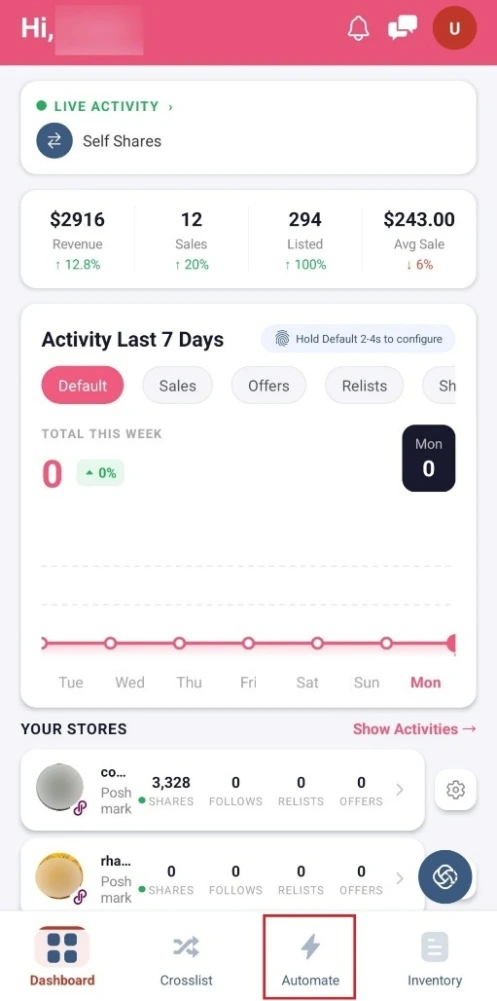
3. Tap “Etsy” and connect your Etsy Account.
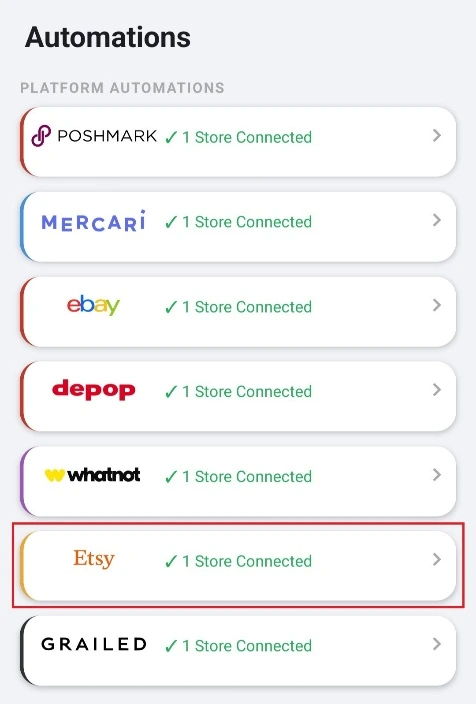
4. Then, tap the “Auto Relist” tab.
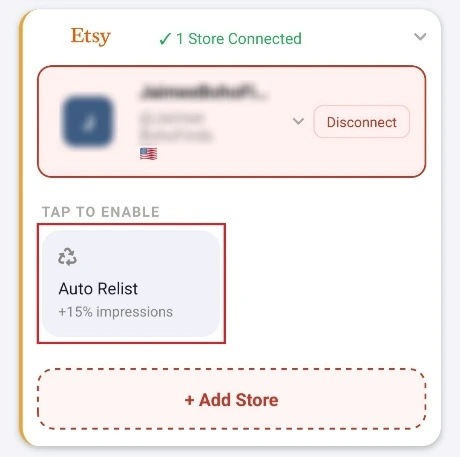
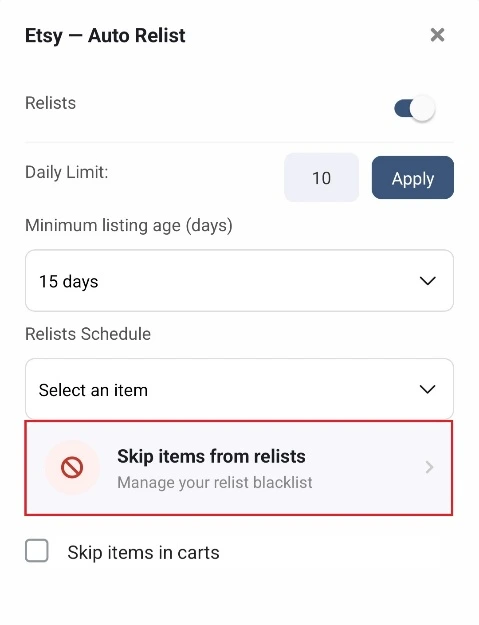
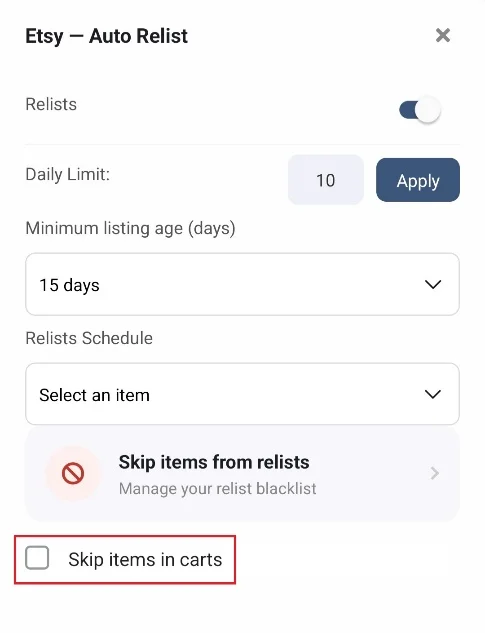
5. In the Auto Relist Settings, turn on the “Relists” toggle.
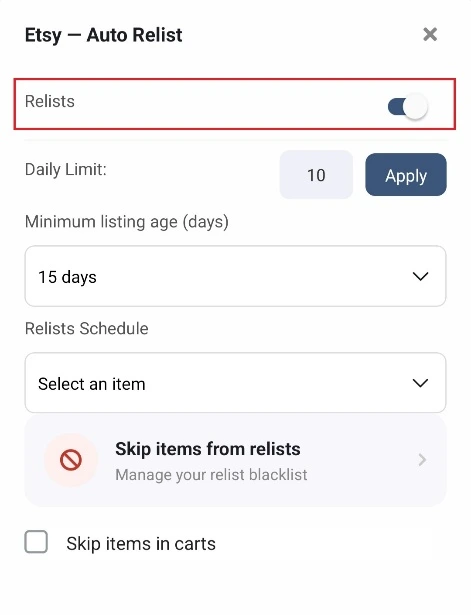
6. Select the “Daily Limit” and tap the “Apply” button.

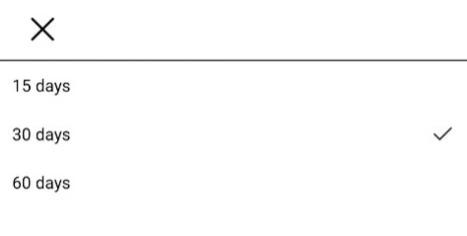
7. Next, select the “Minimum Listing Age (Days)” from the dropdown menu. You can select 15 days, 30 days, or 60 days.
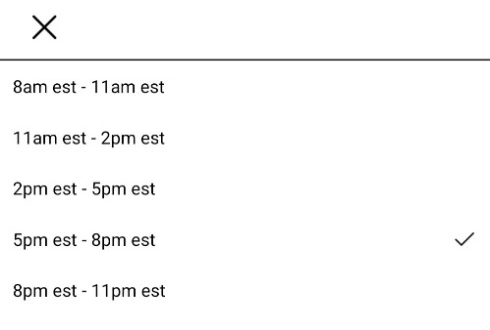
8. Then, select the “Relists Schedule” from the dropdown menu to set the time slot for relisting.
9. Skip Items from Relists
(a) Tap “Skip Items from Relists” if you don’t want to relist some of your items.
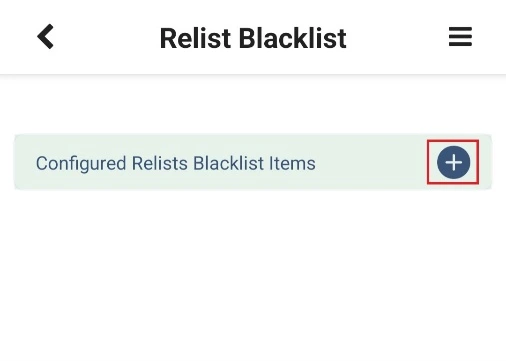
(b) Tap the + icon next to “Configured Relists Blacklist Items.”
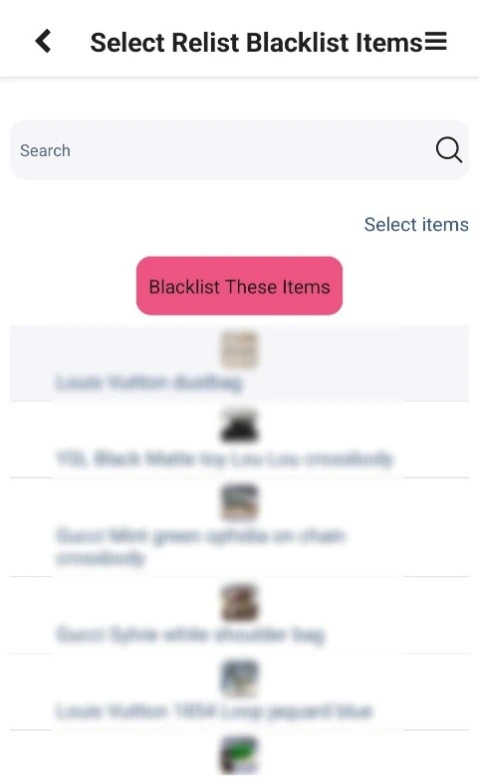
(c) Select the Etsy items one by one that you don’t want to relist and tap the “Blacklist These Items” button.
10. Remove Blacklist Listings
(a) If you want to remove an Etsy listing from the relisting blacklist then tap “Skip Items from Relists.”
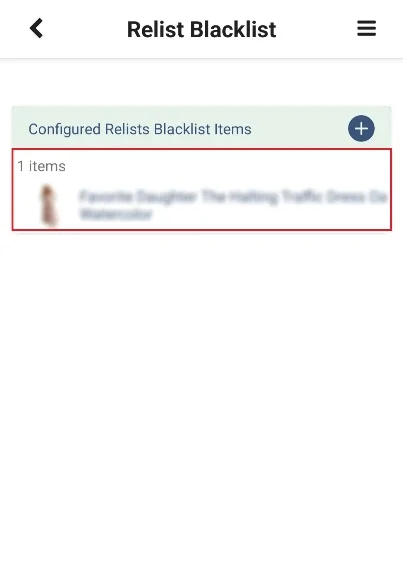
(b) On the Relist Blacklist Page, you will see all the Etsy listings that are blacklisted.
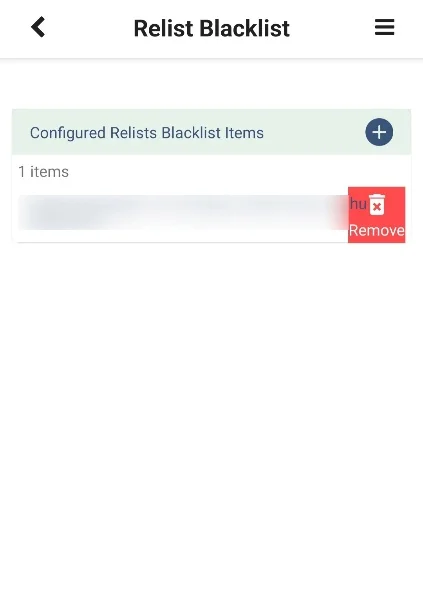
(c) Left swipe the item that you want to remove from the blacklist and tap “Remove.” Then, tap “Yes” to confirm.
11. Lastly, check the “Skip Items in Carts” checkbox if you don’t want to relist items that are already in someone’s cart.
Can You Relist Multiple Items on Etsy at Once?
Yes, with Sidekick Tools, you can auto-relist multiple items on Etsy at once. Instead of opening each Etsy listing and relisting it manually, you can set up automated rules and let the Sidekick Tools app relist eligible Etsy listings for you.
Sidekick Tools allows you to choose a daily relisting limit, so you remain in control of how many items are relisted each day.
You can also set the minimum listing age to 15, 30, or 60 days. This ensures the app only relists older items rather than relisting items that were recently published.
You can also select a preferred relisting schedule. Once your settings are active, Sidekick Tools identifies eligible listings and automatically relists them during the chosen time slot.
The Sidekick Tools app also gives you control over which items to relist. You can blacklist specific Etsy items that you don’t want to relist.
Also Read: How to Relist on Whatnot?
Benefits of Relisting on Etsy
1. Makes the Item Available to Buy Again
Relisting on Etsy puts an expired, sold-out, or inactive item back in your Etsy shop so buyers can purchase it again.
Instead of leaving the Etsy item unavailable, you return it to your active listings. Etsy buyers can then find the item, view its photos, read the description, add it to their cart, and complete an order.
Relisting an item on Etsy is especially useful when you still have the item in stock or can make it again.
2. Gives the Item a New Listing Date
When you relist an Etsy item, it receives a new listing date. This makes the item appear more recent than it did before and gives it a new starting point.
The updated date helps the Etsy listing attract attention from shoppers browsing Etsy or exploring your item.
However, the item still needs clear photos, keywords, tags, accurate details, and a competitive price to convert that attention into sales.
Relisting works best when you review and optimize the listing first. An optimized Etsy listing page combined with a new listing date can get better conversion than the previous listing.
3. Creates Another Opportunity to Appear in Etsy Search Results
Relisting gives an older item another opportunity to appear in Etsy search results.
Once the item gets relisted, Etsy shows it for searches related to its title, tags, category, and item details. This helps the listing reach shoppers who did not see it before.
Increased exposure in Etsy search results brings more views, clicks, favorites, shop visits, and orders.
Relisting does not replace good Etsy SEO, but it gives an improved item listing another chance to reach the right audience and generate sales.
4. Helps You Improve the Etsy Listing Before Relisting
Relisting on Etsy gives you a good opportunity to improve an item before making it available again.
You can replace unclear photos, rewrite the title, add better Etsy tags, improve the description, or change the price. You can also update shipping information, correct missing details, and explain the item’s features more clearly.
These improvements make the Etsy listing easier for buyers to understand and trust. They also help Etsy match the item with relevant searches.
Instead of relisting the same old listing, optimizing the listing before relisting gives the item a stronger chance of receiving clicks, favorites, and orders from interested shoppers.
5. Helps You Test the Item’s Selling Potential
Relisting helps you test whether an older Etsy listing still has the potential to sell.
After relisting the Etsy item again, you can track its views, favorites, clicks, and orders. These results show whether buyers remain interested or whether the item needs further changes.
If the performance of the Etsy listing improves, you can continue selling it or create similar items. If it remains unsold, you can test different photos, keywords, prices, or descriptions.
Relisting on Etsy helps you make smarter sourcing decisions based on real demand instead of assuming the item is no longer worth selling.
How Often Should I Relist on Etsy?
You should relist an Etsy item every 60 to 90 days if it has received almost no views and sales. This gives the item enough time to collect views, favorites, and buyer activity before you replace the old listing.
Avoid relisting the same item every few days because frequent relisting on Etsy gives you little time to measure the listing performance.
Before relisting on Etsy, optimize the listing photos, title, tags, description, and price based on the results of the previous listing.
Frequently Asked Questions (FAQs)
Does relisting on Etsy increase views?
Relisting on Etsy do increase views by giving your listing a new listing date and another chance to appear freshly in Etsy search results. However, the boost is usually temporary.
Relisting works best on Etsy when you also improve the title, tags, photos, price, or description instead of repeatedly relisting an unchanged listing.
Does relisting help Etsy SEO?
Relisting alone does not guarantee higher Etsy rankings. Etsy also considers factors such as keyword relevance, listing quality, conversion rate, reviews, and Etsy shop performance.
Relisting on Etsy can provide short-term visibility, but optimizing your keywords, images, and product details is more effective for long-term Etsy SEO.
What’s the best way to relist items on Etsy?
The best way to relist items on Etsy is by using the Sidekick Tools app.
The Sidekick Tools app simplifies and automates the relisting process, helping you refresh older Etsy listings without manually updating each item.
This saves time, keeps your Etsy listings active, and gives unsold listings another opportunity to attract buyers.
How to decide whether an Etsy listing is worth relisting?
Check the listing’s views, favorites, sales history, profit margin, competition, and seasonal demand. An Etsy listing with favorites or previous sales may be worth improving and relisting.
However, an item with very low demand, high costs, or no engagement after several months will need major changes or removal.