 Skip to content

If you are barely getting any sales on Depop, the problem is rarely “not enough stuff to sell.” It’s usually a few fixable habits.
Maybe the Depop algorithm doesn’t understand your listings. Maybe your older listings need a refresh. Maybe buyers who already liked your stuff never heard from you again.
In this guide, we’ll discuss how to get more sales on Depop in 2026. You’ll learn how the Depop algorithm ranks listings, how to price and photograph items, and how to turn buyer interest into real sales.
How the Depop Algorithm Actually Works in 2026?
Depop doesn’t share its exact ranking formula. But most Depop sellers agree it comes down to four things: relevance, freshness, engagement, and how trusted you are as a seller.
Relevance
Depop’s search and “For You” feed need to know what your item is. They learn this from your title, description, category, and tags together.
A Depop listing’s title like “cute top” tells the algorithm nothing about what the item is about. A title like “Vintage Levi’s 501 Mom Jeans Y2K High Waisted” tells it exactly what to match.
Freshness
New and recently refreshed Depop listings get a visibility boost over ones sitting untouched for weeks. This is why Depop sellers who list consistently usually outsell sellers who list once and walk away.
It’s also why “refreshing” a listing and “relisting” it are two different ways to keep the Depop listing fresh. A refresh gives a small, frequent nudge. Relisting works best on Depop when an item has sat for a couple of weeks with little engagement.
Engagement
The first hour or two after you list on Depop matters most. Early likes, saves, and comments tell Depop there’s real demand.
Depop rewards that early demand by showing your item to more people. This is why “post and forget” fails, even for good items at fair prices. No early activity means the item will quietly sink in Depop search.
Seller’s Trust
Your response time, order history, how active you are as a seller, and how fast you ship affect your whole Depop shop, not just one listing.
Depop sellers who reply to buyers fast and ship on time usually get better visibility across every listing they have on Depop.
How to Get More Sales on Depop?
1. Optimize Every Listing for Depop Search (Depop SEO)
Depop works like a search engine as much as a feed. Treat every Depop listing like a mini SEO page.
Titles:
Lead with words Depop buyers actually search for, not clever descriptions. Include the brand, item type, and style keywords.
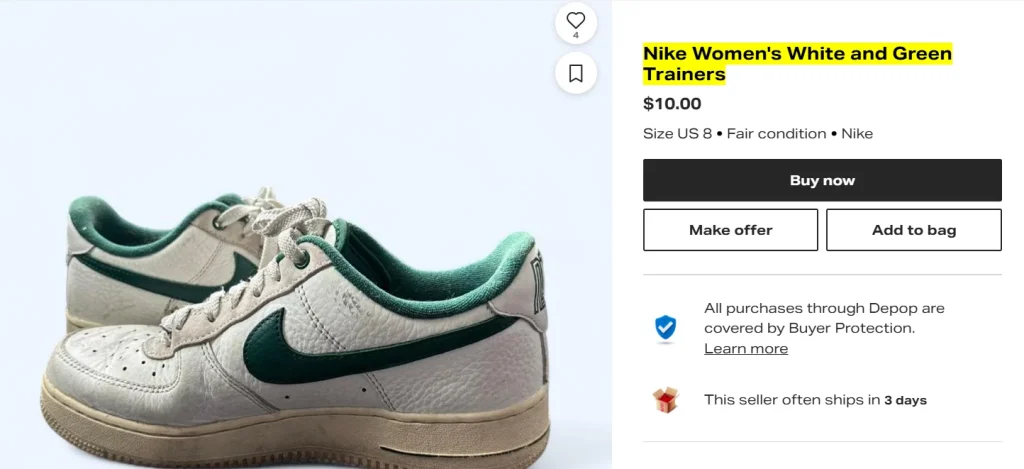
A Depop listing with title “Nike Women’s White and Green Trainers” is good enough to make buyer understand your item. It also matches what people on Depop search for.
Descriptions:
Add material/fabric, measurements, and condition details. Mention styling ideas too.
Depop buyers who read your description are close to buying. Answer their likely questions before they have to ask.
Category and Item Specifics:
Fill these out completely and correctly.
An item in the wrong Depop category won’t show up when buyers filter or browse, no matter how good your title and description are.
Tags:
Depop allows a maximum of 5 hashtags per listing to prevent spam. So, use a mix of tags, including category tag (#jeans), a style tag (#y2k, #streetwear), and a brand tag if it truly applies.
For vintage Levi’s, try #jeans #vintage #levis #momjeans #90sdenim. Only tag brands your item actually is. Fake brand tags hurt trust on Depop and also lower your visibility.
2. Take 8 Great Photos of Your Item
Depop is a visual platform, more like Instagram than a typical marketplace. So, photo quality really matters on Depop.
Depop allows you to upload a maximum of 8 photos and 1 video for each listing. So, it’s better to use all 8 slots to help buyers see your item from all angles.

Shoot in natural light near a window. Indoor bulbs cast a yellow tint that makes items look worn.
Always use a clean, simple background, like a plain wall or a neutral sheet. The item should be the only thing pulling focus.
Also, you should add a flat-lay shot, a modeled shot, and a close-up of fabric or brand tags.
Modeled photos get more engagement than flat-lays on Depop. Show any flaws honestly too.
Showing flaws upfront doesn’t hurt sales. It prevents returns and helps you build trust with buyers.
Moreover, keep your photo style consistent across your Depop shop. Use the same background or lighting each time.
3. Price Your Depop Listings with Room to Negotiate
Most buyers on Depop negotiate price before making a purchase. That’s why it’s important for you to price your items in a way that leaves room for negotiation.
The best way is to list items slightly above your true minimum price. That way, you’ll have room to accept an offer instead of nothing left to give.
Check what similar items actually sold for on Depop, not just what’s listed now.
Overpricing an item will only cost you dearly. Depop buyers will scroll past your items, and they will sit unsold, which will hurt the freshness of your listings.
You can also list multiple items as a bundle on Depop because it not only helps raise your order value but also gives buyers a discount that feels earned.

Moreover, you can offer a flat discount for two or more items. Mention it in your Depop shop bio so buyers know to buy more than one.
Last but not least, while pricing your item on Depop, always consider the fee associated with selling on Depop.
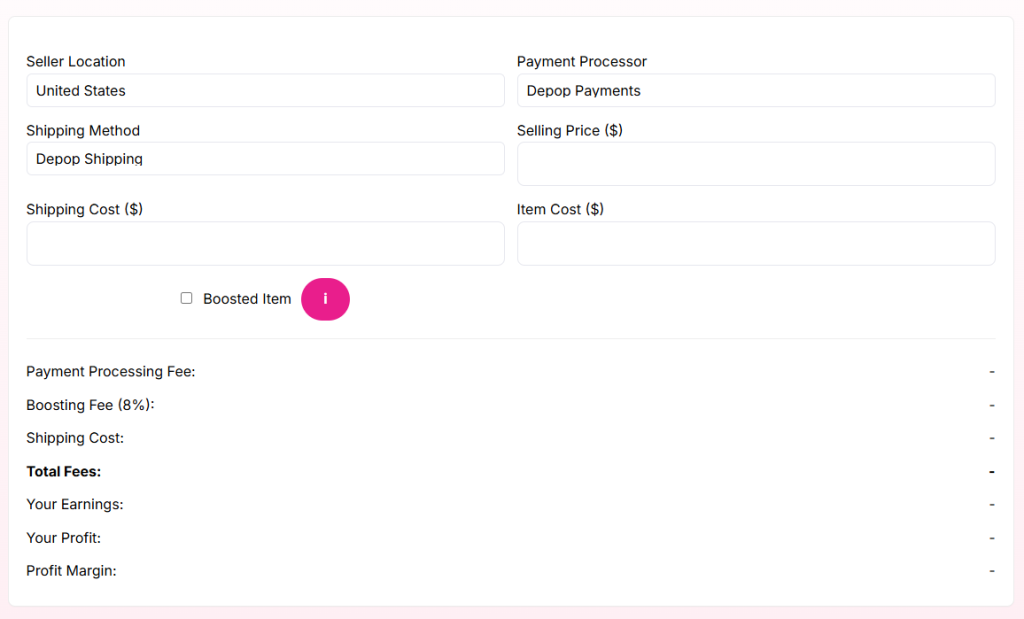
As of 2026, there is no standard selling fee to sell on Depop in the UK, US, and Australia. However, there is a payment processing fee of 3.3% plus $0.45 per sale for the US and 2.9% + £0.30 per sale for the UK that still applies.
You can easily calculate the Depop fees and how much profit you’ll make on each Depop sale using our Depop fee calculator.
4. List & Relist Items Smartly
The Depop algorithm rewards shops that show ongoing activity. List a few new items several times a week instead of fifty items once.
Even if you don’t have new items to list on Depop, you should relist your older items that haven’t sold or gotten any engagement in a while.
Whenever you relist an item on Depop, make sure to make a few changes, like changing the photos or price. Otherwise, it’s just the same old Depop listing with a new timestamp.
However, relisting gets tough once you have more than a few dozen listings. Manually tracking items that are 30+ days old and relisting them is not a good option.
That’s why smart Depop sellers use Sidekick Tools. Its relisting feature helps you automatically relist older and low-engagement items on Depop and pushes them back toward the top of the Depop feed search.

With the Sidekick Tools app, you won’t need to hunt through your Depop shop every day to find what’s gone older.
5. Turn Likes Into Sales by Sending Offer to Likers
A like isn’t a sale on Depop. But it’s the clearest buying signal Depop gives you, and most sellers do nothing with it.
Someone who liked your item on Depop already told you she’s interested. Follow up with an offer while that interest is still warm, not days later.
Sending a small discount offer right after someone likes your item on Depop converts extremely well. It targets buyers who already showed interest.
The problem is volume. A Depop shop with 150 listings will likely get dozens of likes a day. Manually sending offers to every liker is a full-time job and will take a couple of your hours every day.
But what if you have an app installed on your phone that instantly sends an offer whenever someone likes your item on Depop?
Well, there is an app that does it pretty well, and it’s called Sidekick Tools!
The Offer to Likers (OTL) feature within the Sidekick Tools app automatically sends a discount offer the moment someone likes your item.

With Sidekick Tools, you can choose how much discount you want to offer. Also, you can let the app resend the offer after 24 hours.
The best part is that for 7 days, you can use the Sidekick Tools app for free. No credit card needed.
Frequently Asked Questions (FAQs)
How often should you relist on Depop?
You should definitely relist your items on Depop if they remain unsold for 30+ days. Also, you should relist items if they’ve had very low engagement, like very few likes.
Does Depop have a boost or promote feature?
Yes. Depop has a Boosted Listings feature that shows your items higher in search results. Depop charges a 12% boosting fee for sellers in the UK and US, and 8% for sellers in Australia only if the item sells through that boosted placement within 28 days. If it sells organically, there’s no boosting fee.
Is Depop worth it in 2026?
Yes, for sellers who treat it like a real search platform, not a place to dump old clothes. Good titles, consistent listings, and fast replies still work well. Depop remains one of the best marketplaces for reselling vintage and streetwear items, especially with its younger buyer base.
How many hashtags should a Depop listing have?
A Depop listing can have a maximum of 5 hashtags. So, you must add a category tag, a style tag, and a brand tag if it truly applies.
Can automation tools get flagged or hurt my Depop account?
If you’re using a safe automation tool like Sidekick Tools that mirrors normal seller actions, like sending offers or relisting items, just on a schedule, then it won’t flag or hurt your Depop account.
What’s the fastest way to increase Depop sales this week?
Relist your 10 oldest or lowest-engagement items. Add a small price change or new photo. Then send offers to anyone who liked an item recently but hasn’t bought.


