Skip to content

Poshmark recently announced a big change to how your items look on the app. Listing photos are moving from the classic square shape to a taller portrait format.
This update means your product photos will now use a 3:4 ratio instead of the old 1:1 square style. It is a major shift in how poshers browse through their favorite closets.
Poshmark wants to make sure your items look their best while making the selling process faster. Here’s everything you need to know about the new Poshmark update.
Why 3:4 Portrait Photos are Taking Over?
You might wonder why Poshmark decided to move away from the square photos we all know. The main reason is that most people use Poshmark on their phones to shop and sell.
When you take a photo with your smartphone, the camera usually defaults to a tall portrait shape. By matching the app to your camera, Poshmark makes listing much faster.
During recent tests, Poshmark found that shoppers responded very well to these 3:4 ratio photos. Bigger photos mean more details are visible, which will lead to more sales.
This change is all about making the Poshmark app feel more natural and intuitive for everyone.
What Does the 3:4 Ratio Mean?
You might see the term “3:4 ratio” and wonder exactly what that looks like for your Poshmark listings. This simply refers to a portrait-style photo that is taller than it is wide.
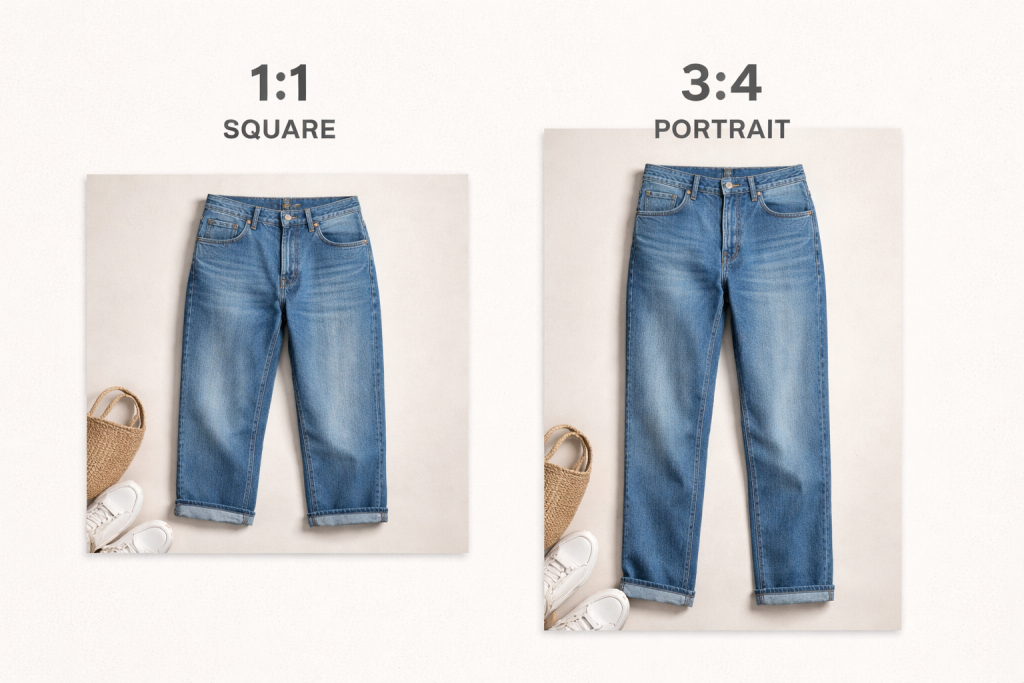
On some devices or camera settings, you may see this same format shown as 4:3. Whether it says 3:4 or 4:3, they represent the same size for your photos.
The 3:4 ratio is perfect for mobile screens because it uses more of the glass. It feels much more modern than the old-fashioned square boxes we used to see.
What Has Changed in Your Poshmark Feed?
The first thing you will notice is that cover photos on Poshmark are now much taller. This extra space is a huge win for items like long dresses or full-length pants.
In the old square format, you often had to cut off the top or bottom of an outfit. Now, you can show the entire piece of clothing in one clear view.
Items now appear larger and more detailed as you scroll through the Poshmark feed. This helps your listings stand out and grab a buyer’s attention quickly.
Taking new photos is also simpler because you no longer need to crop them manually. Your phone does most of the work for you as soon as you snap the item’s photo.
How Will I Upload Product Photos from a Desktop?
While most people use the Poshmark mobile app, there are many sellers who create listings from their computers. That’s why Poshmark has made sure the desktop experience matches the new portrait-style photos.
When you upload item photos on Poshmark from your desktop, they will automatically display in the new portrait frame. You do not need to take any extra steps to make them fit to 3:4 ratio.
If your item photo does not look quite right, you can use the built-in crop and zoom tools. These tools allow you to adjust how your photo appears within the 3:4 frame.
This ensures that even if your original file is a different size, it will still look great. Whether you are on a phone or a computer, the process is now much smoother.
What Will Happen to Photos of Existing Poshmark Listings?
If you have hundreds of Poshmark listings already, don’t worry about going back to fix their photos. Poshmark has made sure that your original photos are still safe and preserved.
No immediate action is required for any listings you made before this March 25, 2026 update. Shoppers can still tap on your listings to see the full original photo format.
You do have the choice to update your cover photos if you want them to fit the new look perfectly. However, this is totally optional and depends on your personal preference.
Poshmark will handle the transition smoothly so you can focus on making new sales. If you do want to create new listings, there are some easy ways to make them look great.
Also Read: How to Delete Comments on Poshmark
Tips for Perfect Portrait Photos for Poshmark Listings
Center Your Item Vertically
Try to keep your item right in the middle of the frame from top to bottom. This ensures it displays perfectly as buyers scroll through the Poshmark feed.
Fill the Frame with Your Item
Whether you are doing a full-length shot or a close-up, make sure the item fills most of the space. This will make the item look clear and easy to see.
Leave Space Around the Edges
It is smart to leave a small amount of breathing room around the sides of your item. This will prevent any part of the clothing item from looking like it is being cut off.
Use Bright and Even Lighting
Good lighting is important for showing the true color and texture of your fabric. Use natural light to help buyers see exactly what they are going to get without any surprises.
Keep Backgrounds Clean and Uncluttered
A simple background keeps the focus entirely on the item you are trying to sell. So, avoid busy rooms or messy floors so your clothing remains the star of the show.
Show the Full Item Every Time
Make sure you do not cut off important parts like hems, sleeves, or thin straps. Show the whole piece, as it will help the buyer understand the shape and fit of the garment.
Highlight Important Details
Use a mix of full-length shots and tight close-ups to tell the condition of your item. Close-ups are perfect for showing off lace, zippers, or patterns.
Keep Angles Consistent
Using the same angle for all your item photos makes your closet look much more professional. Consistency helps your closet feel like a great shop rather than a random collection.
Use Your Phone’s Natural Orientation
When you hold your phone vertically, you are already shooting in the correct portrait mode. This saves you time since you won’t need to rotate or crop your photos later.
Bottom Line
Change can feel a bit sudden, but this Poshmark update is to help sellers succeed. Poshmark is listening to feedback to make sure the app works well for everyone.
Better listing photos lead to more confidence from buyers, which can mean more money in your pocket. Using the 3:4 portrait photos is a simple way to upgrade the aesthetics of your Poshmark listings.
Poshmark plans to keep improving its app based on how buyers and sellers use it. So, it is definitely an exciting time to be part of the Poshmark community.