Skip to content

If you spend time on Poshmark, you have probably seen the word “reposh” pop up in listing titles and comments.
Or, you also might’ve seen people writing “Reposh, worn twice” or “Reposhing this cuz it didn’t fit me.”
At first, it might sound like slang that only poshers understand. It isn’t!
Reposh is a real Poshmark feature, and it is one of the best features on the Poshmark app.
In this guide, we’ll explain what reposh means on Poshmark, how the feature works for buyers and sellers, and how to use it without any confusion.
What Does Reposh Mean on Poshmark?
Reposh on Poshmark means to relist something you bought on Poshmark so you can sell it again on Poshmark.
Think of it like this. You buy a designer handbag from another user. You wear it for a season, then decide it is not really your style.
Instead of letting it sit in your closet forever, you tap the “Reposh” button, and Poshmark will create a brand-new listing of that item for you, using the details and photos from the original listing.
You clean it up, set your own price, and post it.
The word “reposh” is used two ways in the community. It is the name of the feature, and it is also a word people use in their listings to tell shoppers, “I bought this here first.”

When you see “reposh” in a title, the seller is basically saying the item came from another Poshmark closet, not from a store.
Poshmark built this feature to help items move from person to person instead of ending up in the trash.
Every time an item finds a new owner, it stays in use a little longer. That is good for your wallet and good for the planet.
Also Read: What Does NWT Mean on Poshmark?
What is the Point of Reposhing on Poshmark?
Before Reposh existed, selling something you bought on the Poshmark app meant starting from zero.
You had to take fresh photos, type a new title, write a new description, and pick the size, brand, and category all over again. That is a lot of work for one item, and plenty of people just skipped it.
The Reposh feature removes that hurdle. The listing information is already available in your purchase history, so Poshmark simply reuses it.
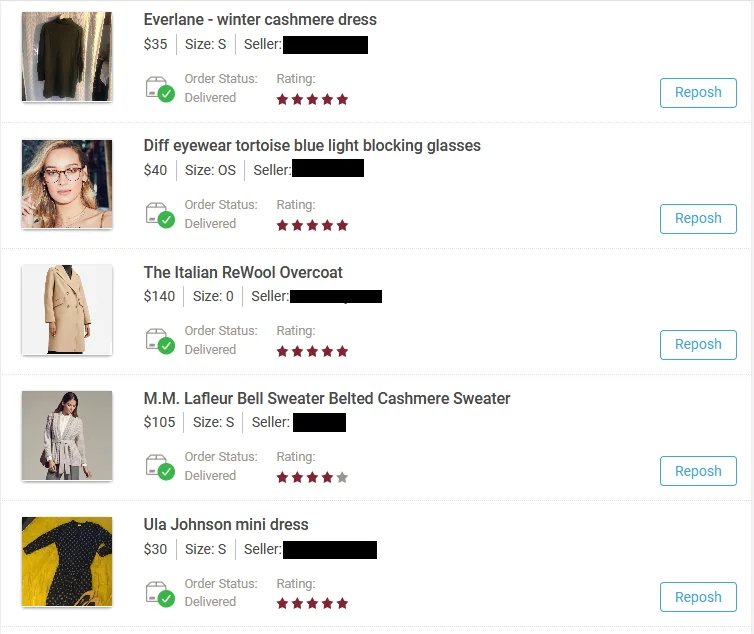
Less work means more people are willing to resell items along instead of holding onto clothes they never wear.
It also fits the whole idea behind resale. One piece of clothing can have three or four owners over the years. Reposh makes that chain easier to keep going.
How to Reposh an Item on Poshmark?
Reposhing an item you bought on Poshmark is simple. Here’s how you can reposh an item on Poshmark:
1. Open the Poshmark app on your mobile device.
2. Tap the profile icon (the one with your @username) on the bottom right corner of your screen.
3. Next, scroll down the menu and tap “My Purchases.”
4. Then, scroll and find the purchased item that you want to reposh.
5. Lastly, tap the “Reposh” button.
What Happens After You Tap Reposh?
You are not stuck with whatever the first Poshmark seller wrote. The new listing is yours, and you can change nearly all of it.
Most people who reposh an item update these things:
– The price. The item is older now, so it usually needs a lower number than what you paid.
– The condition. Say plainly if it has been worn, washed, or has a small flaw.
– The description. Add your own notes, like how it fit you or what you paired it with.
– The photos. You can keep the original photos, add your own, or use a mix of both.
A Quick Tip: If you wore the item, say so. Poshers do not expect a reposhed item to be brand new, but they do expect the truth.
Why Does the Original Seller’s Username Show Up on the Photos After Reposh?
Here is the part that surprises new poshers. If you keep photos from the original Poshmark listing, those photos will show the original Posh seller’s username on them.
This is on purpose. The photos belong to the person who shot them, so Poshmark gives them credit.
It is a small tag, and it does two useful things: it protects the first seller’s photos, and it quietly advertises their Poshmark closet to everyone who scrolls past your listing.
If you would rather not have someone else’s name on your listing, the fix is easy. Take your own photos and use those instead.
Can Poshmark Sellers Prohibit the Use of Listing Photos for Reposh?
Yes. Poshmark sellers can control whether buyers may reuse their listing photos while reposhing, and the setting can be switched on or off at any time. Here’s how to do it:
In the Poshmark app:
1. Open the Poshmark app on your mobile device.
2. Tap the profile icon (the one with your @username) on the bottom right corner of your screen.
3. Tap “My Seller Tools.”
4. Then, tap “Reposh Settings.”
5. Tap the toggle to ON or OFF.
6. Lastly, tap “Save.”
On the Web:
1. Go to Poshmark.com and log in to your account.
2. Click your profile picture in the top-right corner.
3. Select Account Settings.
4. Choose Reposh Settings from the left-hand menu.
5. Click the toggle to switch it ON or OFF.
How Is Reposh Different From Relisting or Copying a Listing?
Reposh is for items you bought on Poshmark. It lives in My Purchases and turns something you own into a new listing in your closet.
Copy Listing is for items you already have listed in your own closet. Sellers use it to refresh an old listing that has been sitting around, because a newer listing shows up higher in search. You copy the listing, then delete the original.
Short version: Reposh starts from a purchase. Copy Listing starts from your own existing listing.
Frequently Asked Questions (FAQs)
Can I reposh an item right after I buy it?
No. The order must be marked as received first. Once that happens, the Reposh button will appear next to that order in the “My Purchases” section on your Poshmark app.
Do I have to use the original seller’s photos while reposhing?
Not at all. You can upload your own photos instead, and honestly that is the better choice for a used item. Your pictures show its real condition today.
Will the original Poshmark seller know I reposhed her item?
There is no alert sent to her, but if you keep her listing photos, her username will appear on those photos. So she may spot it, and other shoppers definitely will.
Does reposhing on Poshmark cost money?
No. Reposh itself is free. You just pay Poshmark’s standard selling fee when the item sells, same as any other listing.
Can I reposh an item I bought somewhere else?
No. Reposh only works with orders in your Poshmark purchase history. For anything else, create a new listing from scratch.
Why don’t I see the Reposh button on my order?
Two common reasons: your order is not marked as received yet, or your Poshmark app needs an update. Update to the latest version and check again.