 Skip to content





Your item just sold on Depop. Now the clock starts, and how you ship it affects how quickly you get paid and the review you receive.
The good news?
Depop shipping is easier than most marketplaces. Just pick the right parcel size, pack it well, drop it off, and Depop handles the shipping label and tracking for you.
Moreover, Depop’s shipping policies changed a bit in 2026. US sellers must now use Depop’s prepaid USPS shipping labels on all new listings.
In this guide, we’ll explain how to ship on Depop. We’ll also explain Depop shipping sizes and costs, who pays the shipping fee, shipping deadlines, and packaging.
But first, let’s look at who pays for shipping on Depop and how Depop shipping works.
Who Pays for Shipping on Depop?
On Depop, the buyer usually pays for shipping. When buyers check out, Depop adds the shipping fee to their total, so they see the full price before they buy.
Sellers on Depop can also choose to cover the shipping fee in two ways.
The first option is free shipping. As a seller, you cover the full shipping label cost, and Depop takes it out of your earnings. To protect your profit, you can raise your item price slightly.
The second option is a shipping discount. You can take $2, $3, or $4 off the buyer’s shipping cost. This discount also comes out of your Depop earnings, and you still ship with a Depop shipping label.
How Does Depop Shipping Work?
Depop shipping works in one of two ways. Either Depop gives you a prepaid shipping label, or you buy your own shipping label and add the tracking number yourself.
Which option you get depends on where you live and when you created the Depop listing. Here’s the quick breakdown.
| Shipping Method | Who Can Use It | Carrier | Who Buys the Label | Tracking | Seller Protection |
| Depop Shipping | US, UK and Australia sellers | USPS (US), Evri (UK), Australia Post (AU) | Depop (buyer pays at checkout) | Automatic | Yes |
| Ship on your own (“Other”) | UK sellers; US listings created before Oct 28, 2026 | Any tracked carrier | You | You add it manually | No |
| Worldwide shipping | Sellers who switch it on per listing | Any tracked carrier | You | You add it manually | No |
What Changed for Depop US Sellers in 2026?
eBay officially completed its acquisition of Depop on July 30, 2026. Since then, Depop has moved fast toward fully managed shipping.
From October 28, 2026, the “Other” (ship on your own) option is gone for new Depop listings in the US. Everything you list from that date uses Depop Shipping through USPS.
Older Depop listings set to “Other” will keep that setting until they sell. But if you delete and relist one, it switches to Depop Shipping automatically.
What About Depop Sellers in the UK and Australia?
Depop sellers in the UK can still choose between Depop Shipping and “Other” shipping.
You can either use Depop’s Evri shipping labels or arrange your own shipping.
In Australia, Depop now requires prepaid Australia Post labels on new listings, rolled out in October 2026.
Depop Shipping Labels
With Depop Shipping, you pick a parcel size when you list an item on Depop. That size sets the label price the buyer sees at checkout.
By default, the buyer pays for shipping on Depop. Depop then sends you a prepaid, tracked shipping label after the sale. You never buy a shipping label yourself.
US Depop Shipping Sizes (USPS)
Pick the size based on the packed weight, not the item alone. Mailers, tissue paper and thank-you cards all add ounces.
| Parcel Size | Max Packed Weight | Best For | Typical Standard Price* |
| Extra Small (XS) | Under 4 oz | Jewelry, pins, sunglasses | ~$4.49 |
| Small (S) | Under 8 oz | T-shirts, tank tops, swimwear | ~$5.39–$5.49 |
| Medium (M) | Under 1 lb | Blouses, light dresses, shorts | ~$7.69–$7.99 |
| Large (L) | Under 2 lb | Jeans, hoodies, sneakers | ~$12.25–$12.49 |
| Extra Large (XL) | Under 10 lb | Coats, boots, bundles | ~$13.99–$16.15 |
*Depop doesn’t publish a fixed shipping fee list, and it runs buyer promotions often. Since July 7, 2026, US buyers have reportedly seen much lower prices: $1.99 for XS to Medium, $3.99 for Large and $5.99 for XL. Always check the price shown on your own listing.
The biggest shipping fee gap is between Medium and Large parcel size. A pair of jeans at 15.9 oz ships as Medium. At 16.1 oz, it becomes Large and costs the buyer more.
What Every Depop Shipping Label Includes?
1. Prepaid USPS shipping label. Usually USPS Ground Advantage (takes about 2–5 business days).
2. Automatic tracking. So you never have to mark the order as shipped manually.
3. Depop Protection for sellers. If you meet the rules (more on that below).
Depop Protection for Sellers
When you use a Depop Shipping label, you are protected by Depop Seller Protection. Depop Seller Protection is a policy that covers sellers if a parcel is lost or damaged. But it only applies when you:
1. Ship with a Depop Shipping label
2. Ship within 5 days of the sale
3. Stay under the sale limit, which is $300 (US), £250 (UK) or A$450 (AU)
If you ship any other way, you’re on your own. That’s the biggest reason to use Depop Shipping labels whenever you can.
Depop International Shipping
International shipping on Depop is off by default. You have to turn it on for each listing and set your own price.
Depop’s prepaid labels only work for domestic orders. So for international sales, you need to buy a tracked shipping label yourself.
Keep these rules in mind:
1. Price for your most expensive country. A shipping price that covers Germany won’t cover New Zealand.
2. Fill in customs forms honestly. Write a clear description (“cotton T-shirt,” not “clothing”), the real sale value and the country of origin. Never mark a sale as a gift.
3. Plan for US import duties. The US de minimis exemption remains suspended, so even cheap parcels can owe duties. Decide upfront who will pay them.
4. No Depop seller protection. If a self-shipped parcel is lost, you have to refund the buyer and claim from the carrier.
How to Get a Shipping Label on Depop?
1. Choose a Shipping Method When You List the Item
You can choose one of two shipping methods on Depop:
Depop Shipping (Prepaid Label)
For this, you must know the approximate weight of your item when you list it.
On the Depop listing form, you select “Depop Shipping” and then choose the shipping tier that matches the item’s weight.
In the US, this means shipping through Depop with USPS (mainland USA only).
For UK sellers, Depop uses Evri as its default integrated courier service via Depop Shipping.
Your Own Shipping
You buy a shipping label yourself, for example at the post office or on a discount shipping label site.
Outside the mainland US, you can still send your package with your local postal service, as long as it offers proof of delivery.
You also decide who pays for shipping when you are shipping an item on your own.
When listing an item, you’ll choose whether the buyer pays for shipping, the seller offers free shipping, or the seller arranges their own shipping without a Depop shipping label.
Tip: Weigh the item with its packaging before you list it. If you pick a tier that’s too light, you can be charged extra afterwards.
2. Make a Sale and Check the Shipping Deadline
When an item sells, Depop will notify you.
As a Depop seller, make a habit of shipping items within 5 business days of receiving the order.
If you don’t ship your Depop order within 10 days, it will be cancelled automatically.
3. Pack the Item
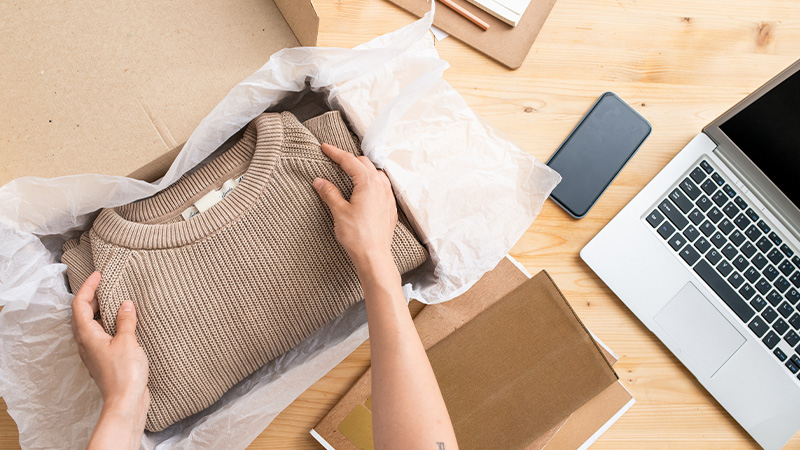
Packing well on Depop protects your item and your reputation. Good shipping keeps buyers happy and earns Depop sellers five-star reviews.
First, clean and fold the item neatly. Wrap fragile pieces in bubble wrap or tissue paper to prevent damage in transit.
Next, choose a sturdy box or poly mailer that fits snugly. Seal it tightly with strong packing tape.
Also, take a few photos of the packed parcel, in case there’s a dispute later.
4. Get Your Shipping Label
If You Chose Depop Shipping
There are a few ways you can get your Depop Shipping label:
Depop will email you a QR code that you can use to ship at your nearest USPS drop-off location. There is also a downloadable Depop Shipping label that you can print at home.
iOS
1. Open the Depop app.
2. Tap “My Depop” and then tap the “Sold” tab.
3. Select the item that you want to ship.
4. Lastly, tap “Ship Your Item Now” to view your QR code and printable shipping label.
Android
1. Open the Depop app.
2. Tap “Selling Hub,” then scroll down and tap “Sold Items.”
3. Select the item that you want to ship.
4. Lastly, tap “View Shipping Label” to view your QR code and printable shipping label.
Web
1. Visit Depop.com.
2. Next, click on your “Profile Photo” in the top right-hand corner.
3. Go to “Your Selling Hub.”
4. In the left-hand menu on this page, go to “Sold.”
5. Select the item you want to ship, then in the drawer that opens on the right you can view your QR code and printable shipping label.
If You Chose ‘Other’ Shipping
iOS
1. Open the Depop app.
2. Tap “My Depop” and then tap the “Sold” tab.
3. Select the item that you want to ship.
4. Lastly, scroll down, and you’ll see an option to mark as shipped and add tracking.
Android
1. Open the Depop app.
2. Tap “Selling Hub,” then scroll down and tap “Sold Items.”
3. Select the item that you want to ship.
4. Lastly, scroll down, and you’ll see an option to mark as shipped and add tracking.
Web
1. Visit Depop.com.
2. Next, click on your “Profile Photo” in the top right-hand corner.
3. Go to “Your Selling Hub.”
4. In the left-hand menu on this page, go to “Sold.”
5. Select the item you want to ship, then in the drawer that opens on the right you can see an option to mark as shipped and add tracking.
5. Drop Off the Package
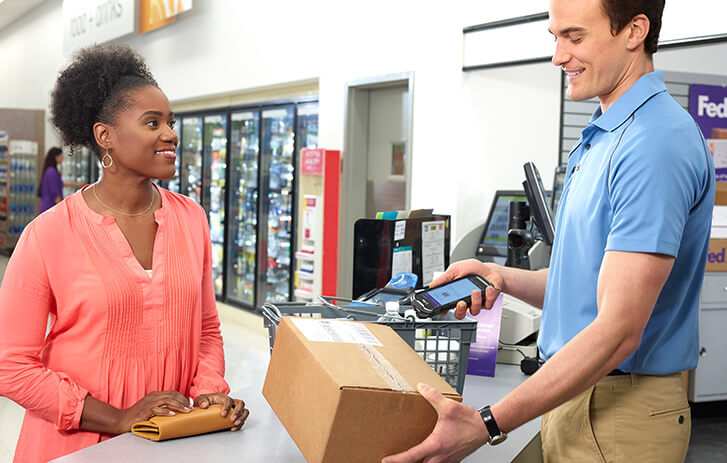
Take it to the carrier, such as a USPS location in the US or an Evri shop in the UK.
In some regions, you can either drop off your item at a local depot or have a courier collect it from your address.
Ask for a receipt or make sure the parcel gets scanned. That scan is your proof that you shipped the order.
6. Mark the Item as Shipped
Depop Shipping Label
Tracking updates automatically.
‘Other’ Shipping (Your Own Shipping)
1. Open the Depop app.
2. Next, tap “My Depop.”
3. Then, go to the “Sold” section and open the order that you want to mark as shipped.
4. Tap “Mark as Shipped.”
5. Add the tracking number and carrier, then confirm.
This doesn’t release your money straight away. Valid tracking matters for seller protection and helps Depop process your payout after delivery.
Common Depop Shipping Problems (and How to Fix Them)
Package Weighs More Than the Shipping Label Allows
Don’t send it anyway!
An undersized package will likely come back to you, or extra postage can be charged and taken from your Depop earnings.
Contact Depop support before you ship.
Sellers report the label size can’t be upgraded in the app, so you may need to cancel and relist with the right size.
Only See Large or XL Sizes for a Light Item
Some Depop sellers have run into this since the October 2026 shipping change.
When you list a light item, such as a T-shirt or jewelry, you should be able to choose a smaller parcel size.
If only Large or XL show up, don’t pick a bigger size and pay more.
Contact Depop support and tell them about the problem so they can fix it.
Lost My Depop Shipping Label
Don’t worry, you can get it back.
Go to your Selling Hub, find the sold item, and open the shipping label again.
You can download or reprint it as many times as you need. But each label can only be used for one package.
Never reuse an old label for a different order, because it won’t track properly.
Tracking Hasn’t Updated
Tracking often takes a while to update, so give it 24 hours after you drop off the package.
Carriers don’t always scan parcels right away.
If it still shows nothing after that, find your post office receipt, because it will prove that you shipped the item.
Then contact Depop support with the receipt so they can check the shipment.
Package Got Lost or Arrived Damaged
How this gets fixed depends on how you shipped.
If you used a Depop shipping label and followed the Seller Protection rules, contact Depop support and send clear photos of the item and packaging.
If you shipped on your own, refund the buyer yourself, then file a claim with your carrier to try to get your money back.
Picked Depop Shipping But Want to Use My Own Shipping
Don’t do it!
Once a buyer pays for a Depop Shipping order, you have to ship it with the Depop shipping label.
If you send it another way, you could lose your seller protection, and Depop may also cancel the order.
That means you might lose both the sale and the item. So, always use the shipping label Depop gives you.
7 Tips to Ship Faster and Cheaper on Depop
1. Weigh everything before you list. Guessing is the number one cause of shipping headaches on Depop.
2. Stock up on poly mailers. They’re cheap, light and keep most clothing in a lower tier shipping.
3. Ship within 2 days. Fast shipping earns better reviews and faster payouts on Depop.
4. Encourage bundles. One shipping label for multiple items saves the buyer money and saves you trips.
5. Use the QR code if you don’t have a printer. It saves ink and time.
6. Get a thermal label printer if you ship daily. It prints 4×6 labels in seconds.
7. Batch your drop-offs. Pack orders once a day and make one trip. If you drop off five or more parcels, print labels at home to keep the line moving.
Frequently Asked Questions (FAQs)
Does Depop pay for shipping?
No. The buyer pays shipping at checkout by default on Depop. Sellers only pay shipping on Depop if they offer free or discounted shipping.
Can I still use my own shipping label on Depop?
In the UK, yes. In the US, you can use your own shipping label only on listings created before October 28, 2026 that are set to the “Other” (independent shipping) option. New US listings must use Depop Shipping.
How long do I have to ship a Depop order?
Depop recommends sellers to ship items within 2 days. Ship within 5 days to keep seller protection. Depop orders not shipped within 10 days are automatically cancelled and refunded.
Do I need a printer to ship on Depop?
No, you don’t need a printer to ship on Depop. Show the QR code from your shipping label email or the app at the post office, and they’ll print it for you.
What carrier does Depop use for shipping?
Depop uses USPS (specifically USPS Ground Advantage) in the US. In the UK, it uses Evri, and in Australia it uses Australia Post.
Does Depop ship internationally?
Yes, Depop supports international shipping, but you need to arrange shipping yourself. Turn on worldwide shipping per listing, set your price, buy your own tracked shipping label, and fill in customs forms.
How do I mark an item as shipped on Depop?
With Depop’s integrated shipping, you don’t need to manually mark the item as shipped. Tracking updates automatically. With your own label, add the tracking number to the receipt and mark it as shipped.


