Skip to content


You listed a gorgeous designer blazer on Poshmark three weeks ago. It’s priced fairly, it’s in great condition, and yet… crickets. No likes, no offers, no sale.
Don’t worry! You’re not alone. Millions of Poshmark sellers watch great inventory sit untouched while other Posh closets seem to sell daily.
Here’s the truth most sellers learn the hard way: on Poshmark, the best item doesn’t win. The best listing does.
In this guide, you’ll learn exactly how to optimize your Poshmark listings for more sales. I’ll also show you how Sidekick Tools can help you make your Poshmark listings better and attract more buyers.
So, let’s begin!
Why Listing Optimization Matters on Poshmark?
Poshmark isn’t just a marketplace. It’s a search engine with a social feed.
When a buyer types “Lululemon Align leggings size 6” into the Poshmark search bar, Poshmark’s algorithm decides which listings appear first.
That decision comes down to a few key signals:
1. Keyword relevance — Does your title and description match what the buyer searched?
2. Listing freshness — Was your item recently listed, shared, or updated?
3. Engagement — Is your listing getting likes, shares, and comments?
4. Completeness — Did you fill out size, brand, color, and category correctly?
If your listing checks all four boxes, it climbs the search results. If it doesn’t, it gets buried under thousands of competing listings.
The good news?
Every one of these signals is within your control. Let’s show you how to optimize them one by one.
How to Optimize Your Poshmark Listings for More Sales?
1. Write Titles That Poshmark Buyers Actually Search For
Your listing title is the first thing Poshmark’s search engine reads, so treat it like prime real estate.
Follow this simple formula for writing titles of your Poshmark listings:
Brand + Item Type + Style Name + Color + Size.
For example, “CHICCO’S Women’s Staple Chic Blue High Rise Wide-Leg Crop Jeans Size 12 EUC” will capture buyers searching for the brand, the style, the fit, and the wash. Four search paths funneling into one listing.
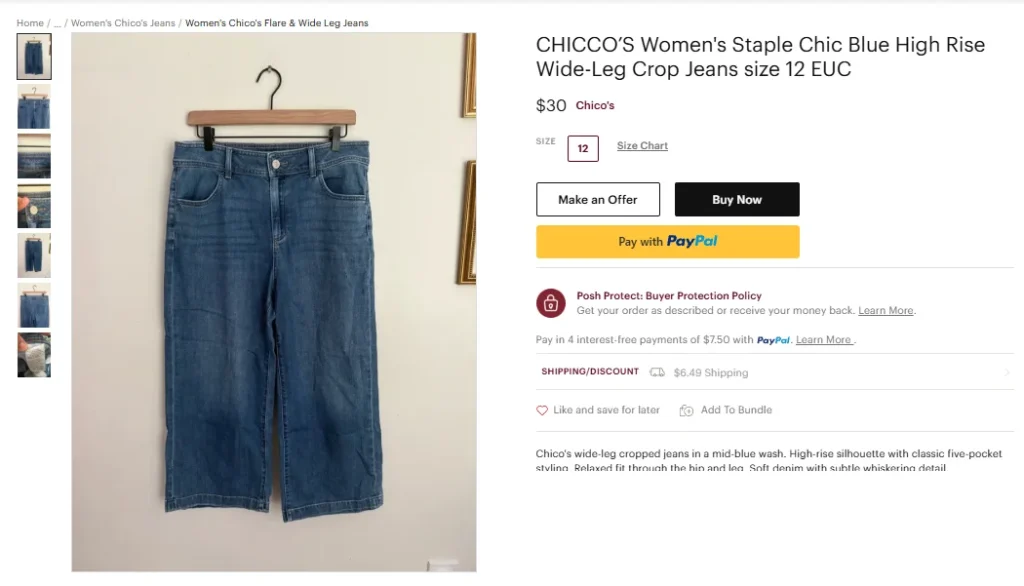
Poshmark gives you 80 characters, so use every character that adds value.
Put the brand name first because it’s the most searched term on Poshmark. Also, include the official style name when you know it, like “Align” for Lululemon or “Air Force 1” for Nike, since buyers on Poshmark search by them.
Skip emojis, all caps, and filler words like “gorgeous” or “must-have.” Nobody types those into the Poshmark search bar.
Before you hit publish, ask yourself one question: what would a buyer actually search to find this item?
That answer is your Poshmark listing title.
2. Front-Load Your Description with Search Terms
Poshmark’s algorithm scans your listing description for keywords, and buyers scan it for confidence. A well-written listing description serves both audiences at once.
Start by restating the essentials in your first line — brand, style, color, and size. This reinforces the keywords from your title and immediately confirms to buyers they’ve found what they searched for.
From there, layer in descriptive terms shoppers actually use: fabric words like “cashmere” or “linen,” fit words like “oversized” or “high-waisted,” and trend terms like “y2k” or “coastal grandmother.”
Then, close with occasion keywords such as “office wear,” “wedding guest,” or “vacation outfit.” These will capture buyers browsing by need rather than by brand.
One warning: write product descriptions naturally. Keyword stuffing — cramming in a wall of unrelated terms — reads as spammy to buyers and can hurt you in search.
Write a product description that flows like a helpful salesperson talking, with keywords woven in seamlessly.
You can use the Sidekick Tools app to write perfectly SEO-optimized product descriptions for your Poshmark listings in seconds.
You just need to input a few basic details like item type, brand name, size, style, color, category, etc. and Sidekick Tools will write the complete Poshmark listing content for you.
3. Include Exact Measurements
Measurements are the unsung heroes of high-converting listings on Poshmark.
Online buyers can’t try anything on, and sizing varies wildly between brands. A size 8 in one label fits like a 4 in another.
Exact measurements remove that guesswork and give hesitant Poshmark buyers the confidence to hit “Buy Now” instead of scrolling away.
Lay your item flat and measure the parts that matter: pit-to-pit and length for tops, waist, rise, and inseam for bottoms, and bust, waist, and length for dresses.
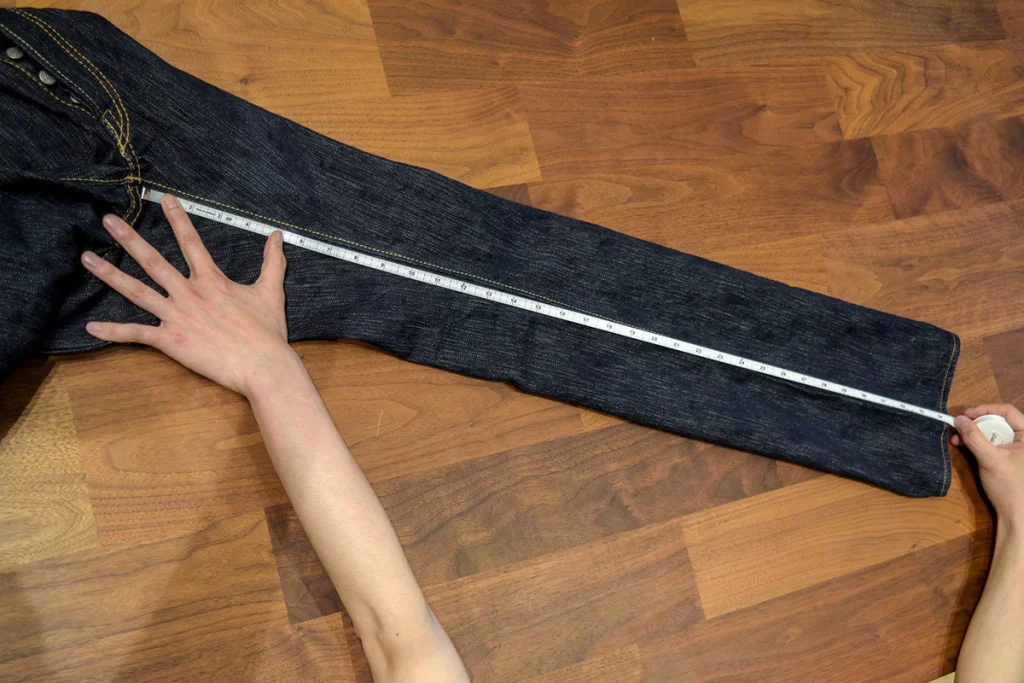
List them clearly in your description, like “Waist: 14 inches flat | Rise: 11 inches | Inseam: 30 inches.”
The payoff is threefold. You’ll answer “will this fit me?” before it’s ever asked, which means fewer comments to manage.
Also, you’ll dramatically reduce return requests and “item not as described” cases. And you’ll signal to buyers that you’re a professional seller — the kind poshers feel safe buying from.
Also Read: Are People Still Making Money on Poshmark?
4. Optimize Your Cover Photo
Buyers on Poshmark decide whether to tap your listing in under a second, and your cover photo makes that decision for them.
You can nail every keyword and still lose the click to a seller with a better item photo. On a visual marketplace like Poshmark, the cover shot is your storefront window.
Always shoot your item in bright, natural light, near a window during the day beats any overhead bulb.

Dim, yellowish photos read as low quality even when the item is pristine.
Also, choose a clutter-free background so nothing competes with your item for attention. A plain wall, a white sheet, or a simple wood floor all work.
You can also remove the background from your item photos using the bulk background remover in the Sidekick Tools app.
Fill the frame with the item, and present it with intention: hang it, lay it flat and smooth, or model it.
A wrinkled pile on a bed tells Poshmark buyers you didn’t care, and they’ll assume the item matches.
Crisp, bright, centered — that’s the click-winning formula.
5. Use All 16 Photo Slots
Poshmark allows you to upload up to 16 photos plus a video in a listing, yet most sellers stop at three or four.
Every empty slot is a missed chance to answer a buyer’s question before they ask it — and unanswered questions are where sales quietly die.
Build a complete visual story: front, back, and side views establish the overall look. Close-ups of fabric texture, buttons, zippers, and stitching show quality.
A clear shot of the brand tag and size tag verifies authenticity and fit. If the item has any flaws — a small stain, light pilling, a loose thread — photograph them honestly and up close.
If you can, add a styled shot showing the item in a full outfit; it helps buyers picture themselves wearing it.
You can use the AI Stock Photo Creator within the Sidekick Tools app to place your flat-lay clothing on a model, giving Poshmark buyers that “how it fits” view without a photoshoot.
6. Complete Every Listing Field
This is probably the easiest way to optimize your Poshmark listings, and yet most sellers skip it.
Poshmark’s search filters run entirely on your listing data. When a buyer filters results by size, brand, color, or category — and most buyers do — any listing with a blank field simply vanishes from their results.
Your item isn’t ranked lower; it’s invisible!
Take the extra thirty seconds to complete everything. Choose the most specific category and subcategory available, like Women > Jeans > Straight Leg rather than just Women > Jeans.
Select the brand from Poshmark’s official list so your item appears on that brand’s dedicated page. Pick up to two colors, since color is one of the most-used filters.

Finally, add up to three style tags such as “cottagecore,” “streetwear,” or “workwear” to capture trend-driven searches.
Think of every completed field as an open doorway into your Poshmark listing — and every blank one as a locked door.
7. Disclose Condition Accurately
Honest condition notes might feel like they’ll scare buyers off, but the opposite is true — transparency is what converts hesitant shoppers into confident buyers.
Poshmark shoppers expect pre-loved items to show some wear. What they won’t forgive is a surprise flaw they notice once they receive the item.
Use Poshmark’s condition labels correctly.
Mark New with Tags (NWT) only when tags are genuinely attached, because many buyers filter searches for NWT items exclusively, and it’s a doorway into those results.
Use New without Tags (NWOT) for unworn items without tags, and describe gently used items plainly.
If there’s a flaw, name it in the description and photograph it up close: “small faint mark on left cuff, shown in photo 7.”
This does three things at once.
It builds trust in you as a seller, it protects you from “not as described” return cases, and it filters out buyers who would have been unhappy anyway — saving everyone time.
8. Set Price Based on Sold Listings
Pricing is where emotion sabotages sellers.
You remember what you paid, so you price high — and buyers scroll past. The fix is letting real data set your price instead of attachment.
Search your exact item on Poshmark, then filter by “Sold Listings.” Active listings show what sellers are wishing for; sold listings show what buyers actually paid.
That sold range, adjusted for your item’s condition, is your true market value.
From there, price strategically: set your listing about 15–25% above your genuine bottom line.
This will leave room for Poshmark’s negotiation culture — buyers love making offers — without inflating the price so much that shoppers dismiss it at first glance.
That buffer also unlocks price-drop promotions and Offer to Likers later, both of which require discounts of at least 10%.
A smart starting price isn’t just a number; it’s the foundation for every discount, offer, and closed sale that follows.
Frequently Asked Questions (FAQs)
How often should I optimize my Poshmark listings?
Review older Poshmark listings every few weeks, especially items receiving few likes or offers. Update the title, description, price, keywords, and cover photo when needed. You can also relist stale inventory to give it a fresh listing date and another chance to appear in Poshmark search results.
What keywords should I use in a Poshmark listing?
Use keywords that accurately describe what buyers are searching for. Include the brand, item type, color, size, material, style, and important features. For example, “Levi’s Women’s High-Rise Straight-Leg Blue Jeans Size 28” is more searchable than a vague title such as “Cute Jeans.”
Do better photos help Poshmark listings sell faster?
Yes. Good photos help buyers understand the item’s color, condition, fit, and details. Use a simple background, natural lighting, and several angles. Include close-up photos of labels, fabric, measurements, and flaws. Your cover photo is especially important because it affects whether shoppers click the listing.
Should I include measurements in my Poshmark listings?
Including measurements reduces buyer uncertainty and helps prevent unnecessary questions or returns. Add relevant measurements such as chest, length, waist, rise, inseam, or sleeve length. Mention that measurements are approximate and taken while the item is lying flat. Detailed sizing information helps buyers feel more confident about purchasing.
Does relisting help increase sales on Poshmark?
Relisting can improve visibility for older Poshmark listings by creating a fresh listing that appears higher in “Just In” search results. Consider relisting items that have been active for several weeks without meaningful engagement. Before relisting, improve the photos, keywords, description, and price rather than simply reposting the same underperforming listing.