Skip to content


Are your Mercari listings sitting dormant with zero sales? If yes, then you’re not alone!
Most Mercari sellers are struggling to make quick sales in 2026 while watching their items collect dust for months.
The good news?
Just relisting them will improve your Mercari sales drastically.
We’ve helped thousands of Mercari sellers boost their sales through our relisting tool, which works with Mercari’s algorithm rather than against it.
In this guide, we will show you exactly how to relist on Mercari and turn your “Zero Sales” listings into “Best-Selling” listings.
What is Relisting on Mercari?
Relisting on Mercari is the process of deleting an existing item from your Mercari shop and immediately creating a fresh listing for that same item.
Because Mercari’s search algorithm prioritizes new listings, older items often sink to the bottom of search results, where Mercari buyers rarely see them.
By relisting, you move your items back to the very top of the Mercari feed, giving them maximum visibility without having to drop your price.
Relisting is a smart way to attract “fresh eyes” to your stale listings, especially if they have gained many likes but no offers or sales.
Why Relist Items on Mercari?
1. Improved Visibility in Mercari Search Results
When you relist an item on Mercari, it appears at the top of Mercari search results.
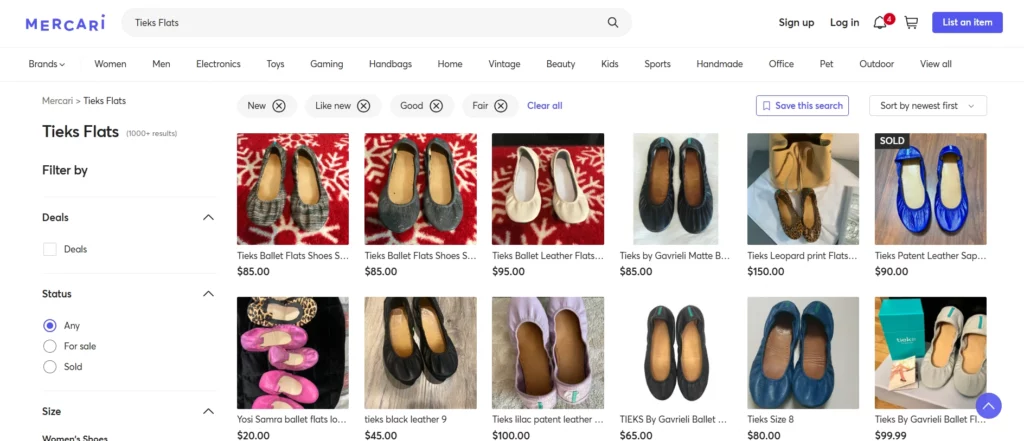
Over time, older listings naturally sink down as new items get listed on Mercari.
Relisting refreshes your item’s position, increasing its visibility to active buyers who usually focus on recently listed items.
This simple action significantly boosts your chances of making a sale by putting your item in front of more Mercari buyers.
2. Opportunity to Refine Listings
Relisting provides you a chance to evaluate and improve your existing Mercari listings.
You can update item photos with better lighting or angles, rewrite titles and descriptions with more keywords, or adjust your pricing strategy based on market trends.

Perhaps your old Mercari listing didn’t highlight a desirable feature or detail that would have attracted buyers.
Each time you relist items on Mercari is basically a fresh opportunity to present your items more effectively based on what you’ve learned.
3. Capitalizing on Seasonal Buyer Interests
Consumer buying patterns fluctuate throughout the year based on seasons, holidays, and trends.
An item that didn’t sell during summer on Mercari might find lots of buyers as fall approaches.

Relisting on Mercari enables you to time your selling strategy to align with these shifting market demands.
This strategic approach keeps your items relevant to what buyers on Mercari are actively searching for, increasing the likelihood of connecting with buyers at precisely the right moment.
Also Read: How to Relist on Depop
Does Relisting on Mercari Help with Sales?
Yes, relisting on Mercari does help in increasing your sales because of how the app’s search algorithm functions.
When you first list an item on Mercari, it appears at the very top of search results and category feeds.
Over time, as thousands of new items are uploaded, your item gets buried deep, where Mercari buyers rarely scroll.
By deleting and relisting the item, you push it back to the top of the Mercari feeds.
Relisting items is generally more effective than simple price drops on Mercari because it resets the “likes” and helps you reach completely new buyers.
When Should I Relist on Mercari?
You should relist items on Mercari every 30 to 45 days to get them back to the top of Mercari app search results.
While some aggressive Mercari sellers relist every two weeks to keep inventory “fresh,” waiting at least 30 days ensures you don’t look like spam to the Mercari algorithm.
The best time to relist on Mercari is during weekday evenings between 7:00 PM and 10:00 PM or on Sunday afternoons.
This is when shopping traffic on Mercari peaks, giving your “just listed” item the most visibility.
How to Relist Active Items on Mercari?
1. Open the Mercari app on your phone and log in to your account.
2. Next, tap on the “Selling” tab, right at the bottom of your screen.
3. Then, find the item that you want to relist.
4. Open the listing and save the details and photos of that item.
5. Next, tap the three-dot menu on the top right of your screen and tap “Sell Similar Item.”
6. Add details and photos of your item and tap “List.”
7. Lastly, go back to the “Selling” tab and open the older listing. Tap the three-dot menu on the top right of your screen and then tap “Delete Item.”
How to Relist Sold Items on Mercari?
1. Open the Mercari app on your phone and log in to your account.
2. Then, tap on the “Selling” tab, right at the bottom of your screen.
3. Next, find the item that you want to relist (It will be under the “Sold” section).
4. Tap the “Relist” button next to the listing.
5. Make changes to the title, description, photos, or details, if you want to make any.
6. Lastly, tap the “List” button.
How to Relist on Mercari Using Sidekick Tools?
1. Open the Sidekick Tools app on your Android/iOS mobile device and sign in to your account.
2. Next, tap “Crosslisting”on the bottom right of the screen.
3. Then, tap the “Hamburger Menu”on the top right of the screen and from the menu options, select “Relisting.”
4. Next, select “Mercari” from the available marketplaces. (Connect your Mercari account to the Sidekick Tools app first if it’s not already connected.)
5. Then, switch the toggle to “On.”The toggle button will be right in front of “Relists”under the Mercari tab.
6. Select “Minimum Listing Age (Days)”and “Relists Type.”
7. Check “Skip Items on Sale” if you don’t want to relist items that are on sale.
8. After that, select “Relists Schedule.”
9. Lastly, tap “Skip Items from Relists” to skip any items that you don’t want to relist.
Relist Items for Free on Mercari Using Sidekick Tools 7-Day Trial
If you want to increase your Mercari sales for free, Sidekick Tools offers a 7-day trial of the automation app. No credit card required!
The best part?
You can access our full suite of marketplace automation features, including the powerful Mercari bot.
By using the relisting tool within the Sidekick Tools app, you can automatically relist your items and push them back to the top of the Mercari search feed, where buyers are most active.
Start your free 7-day trial now!
Frequently Asked Questions (FAQs)
What is the difference between “Promoting” and “Relisting” on Mercari?
Promoting on Mercari is dropping your item’s price by at least 5% to “bump” the item to the top of Mercari search results and notify likers.
Relisting on Mercari means creating a brand-new listing for the item (and deleting the old one).
Relisting is better for items that have been sitting for over 30 days because it treats the item as a “New Arrival.”
Will I lose my “Likes” if I relist an item on Mercari?
Yes. When you relist an item on Mercari, you are creating a completely new listing, which means the “Likes” on the old listing will disappear once you delete it.
However, this isn’t necessarily a bad thing!
If those likers haven’t bought the item after several price drops or promotions, they likely aren’t going to.
Relisting helps you find new and serious buyers on Mercari who might be ready to purchase your item at your current asking price.
Should I change my photos or description when relisting on Mercari?
Yes. If an item didn’t sell the first time on Mercari, it probably needs a “glow-up.”
When relisting an item on Mercari, check if your cover photo could be brighter or if your keywords are still relevant.
You can use the free AI product description writing tool and the AI stock photo creator within the Sidekick Tools app to help you add missing details, and that might have been the reason previous buyers didn’t buy.
Can I use third-party automation tools to relist automatically on Mercari?
Absolutely. Many resellers on Mercari use auto relisting tools like Sidekick Tools to delist and relist items automatically.
Relisting apps like Sidekick Tools can save you hours by automatically deleting old listings and relisting them on Mercari.